Docker Compose Watch and Docker Init: A Faster Inner Loop for Modern Application Development
The usual complaint about developing inside containers is speed. You change one line, rebuild an image, wait, restart, and by the time the app is back you have forgotten what you were testing. The usual workaround is a bind mount of the source directory, which is fast but brings its own problems: file ownership surprises, slow file events on macOS and Windows, and node_modules or virtualenvs getting clobbered by the host's version.
Two features that arrived in Docker this year fix most of this. docker init generates a sensible Dockerfile and Compose file for your project. Compose Watch, added in Docker Compose 2.22 and Docker Desktop 4.24, updates running containers when files change, and picks the cheapest action for each kind of change. This post uses both on a small Python API with a Node frontend, and shows where each one earns its keep.
Start with docker init
docker init inspects the current directory, asks a few questions and writes four files: Dockerfile, compose.yaml, .dockerignore and README.Docker.md. It supports Go, Python, Node, Rust, ASP.NET and a generic option at the time of writing.
cd shop-api
docker init
# ? What application platform does your project use? Python
# ? What version of Python do you want to use? 3.12
# ? What port do you want your app to listen on? 8080
# ? What is the command to run your app? uvicorn app:app --host=0.0.0.0 --port=8080
The Dockerfile it writes is worth reading, not just accepting. It follows habits that many hand-written Dockerfiles miss:
# syntax=docker/dockerfile:1
ARG PYTHON_VERSION=3.12
FROM python:${PYTHON_VERSION}-slim as base
# Keeps Python from generating .pyc files and buffering stdout
ENV PYTHONDONTWRITEBYTECODE=1
ENV PYTHONUNBUFFERED=1
WORKDIR /app
# Create a non-privileged user
ARG UID=10001
RUN adduser --disabled-password --gecos "" --home "/nonexistent" \
--shell "/sbin/nologin" --no-create-home --uid "${UID}" appuser
# Cache pip downloads between builds and bind-mount requirements instead of COPY
RUN \
python -m pip install -r requirements.txt
USER appuser
COPY . .
EXPOSE 8080
CMD uvicorn app:app --host=0.0.0.0 --port=8080| Habit in the generated file | What it buys you |
|---|---|
Pinned slim base image through ARG | Smaller image, one place to bump the version |
Non-root appuser | Smaller blast radius if the app is compromised |
--mount=type=cache for pip | Dependencies are not re-downloaded on every rebuild |
--mount=type=bind for requirements | The requirements file is not baked into a layer |
.dockerignore | Keeps .git, __pycache__ and local env files out of the build context |
I still edit the output. For my own projects I split a multi-stage build so the final image carries no build tools, and I pin the base image by digest in CI. But starting from a correct file instead of copying one from an old project is a real saving, and new team members stop inheriting the old project's mistakes.
The inner loop problem
Before Watch, you picked between two imperfect options.
| Approach | Speed on change | Problem |
|---|---|---|
Rebuild on every change (docker compose up --build) | Slow, seconds to minutes | Breaks flow |
| Bind mount the source directory | Instant | Host and container filesystems tangled, permissions, slow file events on non-Linux hosts, dependency directories overwritten |
| Run the app on the host, only dependencies in containers | Fast | "Works on my machine" returns, differing runtimes |
Compose Watch gives you a fourth option. You describe which paths matter and what to do when they change. Docker watches the host files and applies the right action.
Configuring Compose Watch
Add a develop.watch section to each service. Each rule has a path, an action, and usually a target.
# compose.yaml
services:
  api:
    build: ./api
    ports: ["8080:8080"]
    depends_on:
      db: { condition: service_healthy }
    develop:
      watch:
        # Source code: copy changed files in, no rebuild
        - action: sync
          path: ./api
          target: /app
          ignore:
            - __pycache__/
            - "*.pyc"
        # Dependency manifest changed: rebuild the image
        - action: rebuild
          path: ./api/requirements.txt

  web:
    build: ./web
    ports: ["3000:3000"]
    develop:
      watch:
        - action: sync
          path: ./web/src
          target: /app/src
        - action: rebuild
          path: ./web/package.json

  db:
    image: postgres:16
    environment:
      POSTGRES_PASSWORD: example
    healthcheck:
      test: ["CMD-SHELL", "pg_isready -U postgres"]
      interval: 5s
      retries: 5
Then start it with watch enabled:
docker compose watch
# or, to run in the foreground with logs and watch together:
docker compose up --watch
The three actions
| Action | What happens | Use it for |
|---|---|---|
sync | Changed files are copied into the running container | Source for frameworks with hot reload (uvicorn --reload, Vite, Next.js dev) |
rebuild | The image is rebuilt and the service container is recreated | Dependency manifests, Dockerfile changes, compiled languages |
sync+restart | Files are copied, then the container restarts | Config files and apps without hot reload |
sync+restart arrived in Compose 2.23, a few weeks after the first Watch release. It fills the gap for things like an nginx config or a Go service where you want the process restarted but not the whole image rebuilt.
    develop:
      watch:
        - action: sync+restart
          path: ./nginx/nginx.conf
          target: /etc/nginx/nginx.conf
For the Python service, make sure the process itself reloads on code changes. Watch copies the file, and the server decides what to do with it:
CMD ["uvicorn", "app:app", "--host=0.0.0.0", "--port=8080", "--reload"]Put --reload in a dev override file rather than the production Dockerfile:
# compose.override.yaml (picked up automatically in development)
services:
  api:
    command: ["uvicorn", "app:app", "--host=0.0.0.0", "--port=8080", "--reload"]
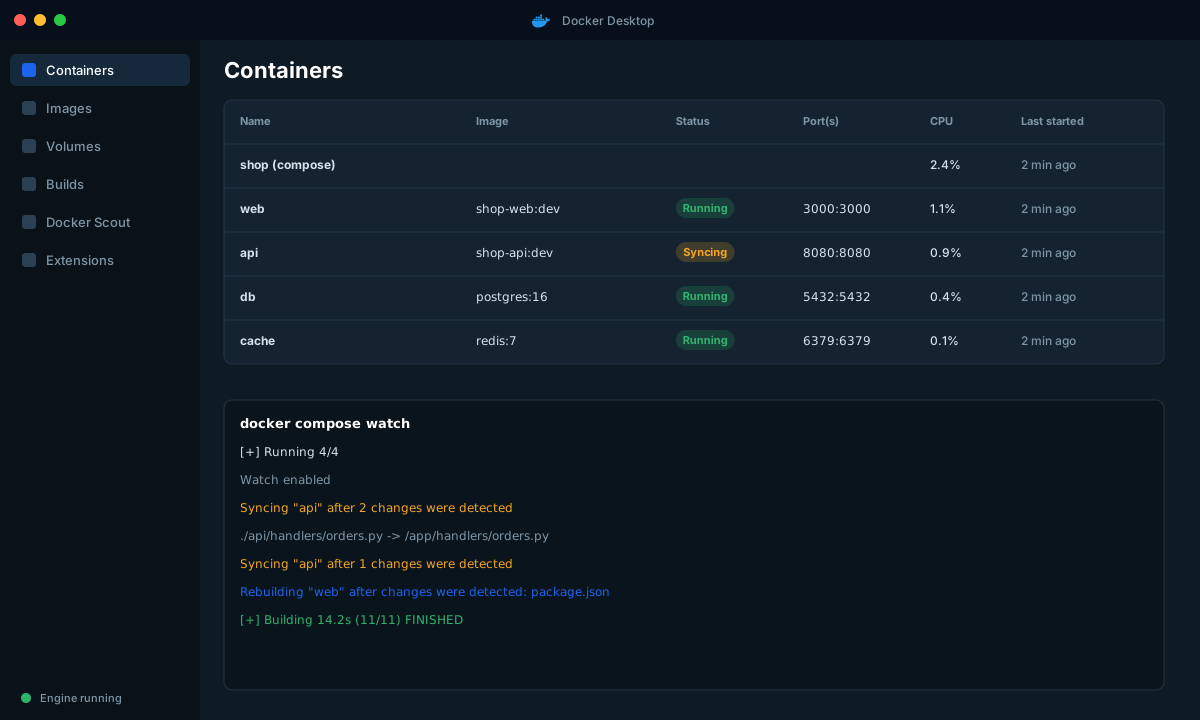
What it looks like in practice
A typical session produces output like this, and the pattern is what to look for:
$ docker compose watch
[+] Running 4/4
 ✔ Container shop-db-1     Healthy
 ✔ Container shop-api-1    Started
 ✔ Container shop-web-1    Started
Watch enabled
Syncing "api" after 2 changes were detected
Rebuilding "web" after changes were detected: package.json
Edits to small source files sync almost immediately, though timing depends on your host and file system. A change to package.json triggers a rebuild, which is fast on the second time because the dependency layer is cached unless the lockfile changed.
Choosing paths carefully
Most problems with Watch are really problems with the path rules.
- Be specific. Watching
.withsynccopiesnode_modulesand.gitevents constantly. Watch./srcand list exclusions inignore. - Order matters little, overlap matters a lot. If two rules match the same file, both actions can fire. Keep source and manifest rules in separate directories or use
ignore. - Dependencies should rebuild, never sync. Syncing a lockfile without installing gives you a running container that disagrees with its own dependency list.
- Respect
.dockerignore. Rebuild actions use the normal build context, so ignored files are not part of the rebuilt image. - Compiled languages. For Go or Rust, use
rebuildon source with a multi-stage Dockerfile that has a fast incremental build stage, orsync+restartwith a tool likeairorcargo watchinside the container.
Watch versus bind mounts
Watch does not replace bind mounts everywhere. Here is how I choose:
| Situation | Prefer |
|---|---|
| Interpreted app with hot reload, team on mixed macOS, Windows and Linux | Watch (sync) |
| Need to edit files from inside the container, or share a data directory | Bind mount |
| Dependencies live in a directory you do not want overwritten | Watch, so the host copy never replaces them |
| Debugging with an IDE attached to the container | Either, depending on the IDE workflow |
| CI | Neither. Build the real image and test that |
Watch also avoids the classic node_modules problem. With a bind mount, the host's node_modules (built for macOS) replaces the container's (built for Linux). With Watch you sync only src, and the container keeps its own dependencies.
Making the loop faster still
A few BuildKit habits compound with Watch, because rebuild is still the slow path:
# Order layers from least to most frequently changed
COPY package.json package-lock.json ./
RUN npm ci
COPY src ./src| Tip | Effect |
|---|---|
| Copy manifests before source | Dependency layer survives source-only changes |
| Cache mounts for package managers | Rebuilds do not re-download the world |
Keep .dockerignore tight | Smaller build context, faster upload to BuildKit |
| Use a slim or distroless runtime stage | Smaller image to build and pull |
Enable BuildKit inspection with docker buildx build --progress=plain | See exactly which step is slow |
A reasonable team setup
What I would put in a repo so a new developer is productive in minutes:
shop/
├── compose.yaml            # base, production-like
├── compose.override.yaml   # dev: --reload, debug ports, watch rules
├── api/
│   ├── Dockerfile
│   └── requirements.txt
├── web/
│   ├── Dockerfile
│   └── package.json
└── README.md # "docker compose watch" and nothing else# New developer, day one
git clone git@github.com:acme/shop.git
cd shop
docker compose watchThat is the whole onboarding for local development. No Python version manager, no Node version manager, no Postgres install.
Limits and rough edges
Compose Watch was new when I wrote this, so check your version with docker compose version (2.22 or newer, 2.23 for sync+restart). Things to know:
- It does not handle deleting a service's volumes or data. That is still your call.
- Large numbers of changing files, for example from a code generator, can queue up. Add them to
ignore. - It watches host paths, so it needs Docker Desktop or Docker Engine with Compose able to reach your files. Remote contexts behave differently.
- Features are still evolving. Read the release notes when you upgrade.
Wrap-up
docker init fixes the blank-page problem with a Dockerfile that already follows good habits, and Compose Watch fixes the slow-feedback problem without the mess of bind-mounting everything. Start with one sync rule for source and one rebuild rule for dependencies. That covers most of the benefit, and you can add sync+restart for config files when you need it.