Docker Model Runner and Compose: Local LLM Development Without the Cloud Bill
Building an LLM feature has an awkward development loop. Every prompt tweak is a paid API call, every test run is slow, CI needs credentials it should not have, and an airplane means no work. Teams respond by mocking the model, which then lets bugs through, or by letting developers burn through a shared API key.
Docker Model Runner, which arrived in Docker Desktop in spring 2025 as a beta, is a different answer. It runs open-weight models on your own machine, pulls them from Docker Hub like images, and exposes an OpenAI-compatible API. Your application code does not change between local and cloud, only the base URL does. This post shows the setup, a small Compose project that uses it, and the places where local models are the wrong tool.
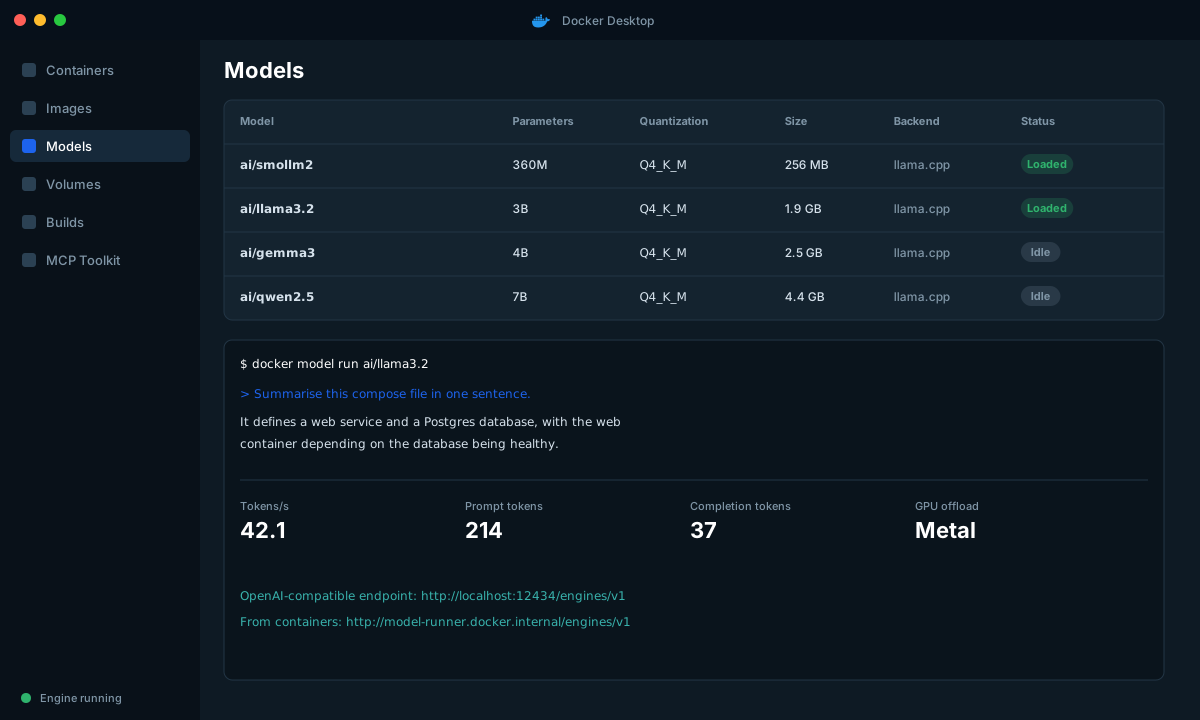
What Model Runner is, and is not
| It is | It is not |
|---|---|
A way to pull, run and manage models with docker model commands | A production inference server |
| An inference engine (llama.cpp) running on the host, using GPU where available | A container per model (the engine runs on the host for GPU access) |
| OpenAI-compatible HTTP API at a stable local endpoint | A replacement for Bedrock, Vertex AI or Azure AI Foundry |
Models packaged as OCI artifacts in the ai/ namespace on Docker Hub | A guarantee your laptop can run a 70B model |
GPU support depends on your platform and Docker Desktop version. When I wrote this, Apple silicon was supported first, with NVIDIA GPUs on Windows arriving shortly after. Check the release notes for your platform before you plan around it.
Setup
Enable it in Docker Desktop under Settings, then Features in development (the exact label may change, since it is a beta). Enable host-side TCP support if you want to call it from outside containers.
# Check it is running
docker model status

# Pull models (stored locally as OCI artifacts)
docker model pull ai/smollm2
docker model pull ai/llama3.2
docker model pull ai/mxbai-embed-large

# See what you have
docker model list

# Quick interactive chat
docker model run ai/llama3.2

# One-shot prompt
docker model run ai/llama3.2 "Summarise this compose file in one sentence."
Model sizing is the first constraint you will hit. As a rough guide, a quantized model needs memory about equal to its file size plus overhead for the context window:
| Model class | Typical quantized size | Comfortable on | Good for |
|---|---|---|---|
| ~360M parameters | 0.3 GB | Any laptop | Tests, smoke checks, routing and classification |
| 1B to 3B | 1 to 2 GB | 8 GB RAM | Drafting, extraction, summarization of short text |
| 7B to 8B | 4 to 5 GB | 16 GB RAM | Reasonable chat, coding help, tool use experiments |
| 70B | 40 GB+ | Workstation or server GPU | Not a laptop target |
Two endpoints
From a container, the engine is reachable at a Docker-provided hostname. From the host, use localhost on the TCP port.
| Caller | Base URL |
|---|---|
| Container in Docker Desktop | http://model-runner.docker.internal/engines/v1 |
| Host process (TCP enabled) | http://localhost:12434/engines/v1 |
Test it from the host with plain curl:
curl http://localhost:12434/engines/v1/chat/completions \
  -H "Content-Type: application/json" \
  -d '{
    "model": "ai/llama3.2",
    "messages": [{"role": "user", "content": "Name three uses of docker compose watch."}],
    "max_tokens": 120
  }'
An app that does not care where the model lives
The pattern that keeps this useful: configure the model by environment variables, use the standard OpenAI client, and never hardcode a provider.
# api/llm.py
import os
from openai import OpenAI

client = OpenAI(
    base_url=os.environ["LLM_BASE_URL"],
    api_key=os.environ.get("LLM_API_KEY", "not-needed-locally"),
)
CHAT_MODEL = os.environ["LLM_MODEL"]
EMBED_MODEL = os.environ.get("EMBED_MODEL")

def summarize(text: str) -> str:
    resp = client.chat.completions.create(
        model=CHAT_MODEL,
        messages=[
            {"role": "system", "content": "Summarise in two sentences. Plain language."},
            {"role": "user", "content": text},
        ],
        temperature=0.2,
        max_tokens=200,
    )
    return resp.choices[0].message.content

def embed(texts: list[str]) -> list[list[float]]:
    out = client.embeddings.create(model=EMBED_MODEL, input=texts)
return [d.embedding for d in out.data]# api/app.py
from fastapi import FastAPI
from pydantic import BaseModel
from llm import summarize
app = FastAPI()
class Doc(BaseModel):
text: str
@app.post("/summarize")
def summarize_endpoint(doc: Doc):
return {"summary": summarize(doc.text)}Now the Compose file. The developer profile points at the local runner. Anything else is configured through the environment.
# compose.yaml
services:
  api:
    build: ./api
    ports: ["8080:8080"]
    environment:
      LLM_BASE_URL: ${LLM_BASE_URL:-http://model-runner.docker.internal/engines/v1}
      LLM_MODEL: ${LLM_MODEL:-ai/llama3.2}
      EMBED_MODEL: ${EMBED_MODEL:-ai/mxbai-embed-large}
      LLM_API_KEY: ${LLM_API_KEY:-}
    develop:
      watch:
        - action: sync
          path: ./api
          target: /app
        - action: rebuild
path: ./api/requirements.txt# Local: uses the defaults above, no key, no cost
docker compose watch
# Against a cloud endpoint (for example in a staging environment)
LLM_BASE_URL=https://my-resource.openai.azure.com/openai/v1 \
LLM_MODEL=gpt-4o-mini \
LLM_API_KEY=$AZURE_KEY \
docker compose upNot every cloud provider speaks the OpenAI API natively. Some do (Azure's endpoints and Vertex AI's OpenAI-compatible endpoint for certain models), and for Bedrock the usual answer is a thin gateway such as LiteLLM that translates. Put that translation in one service, so your application code stays uniform.
Using it in tests without a flaky suite
Real model output is not deterministic, so do not assert on exact text. Test properties instead:
# tests/test_summarize.py
import json, pytest
from llm import client, CHAT_MODEL

def test_extracts_valid_json():
    resp = client.chat.completions.create(
        model=CHAT_MODEL,
        messages=[{"role": "user",
                   "content": 'Return only JSON {"city": string} for: "I flew into Lisbon on Friday."'}],
        temperature=0,
        response_format={"type": "json_object"},
    )
    data = json.loads(resp.choices[0].message.content)
    assert "city" in data

def test_respects_max_tokens():
    resp = client.chat.completions.create(
        model=CHAT_MODEL, messages=[{"role": "user", "content": "Count to one hundred."}],
        max_tokens=20)
assert resp.usage.completion_tokens <= 20| Test type | Where it runs | Model |
|---|---|---|
| Unit tests for prompt assembly, parsing | Everywhere, including CI | None, mocked |
| Contract tests (valid JSON, schema, length limits) | Laptop and CI with a small model | ai/smollm2 or similar |
| Quality evals (is the answer good?) | Scheduled job | Production-class cloud model |
A tiny model is fine for checking that your plumbing works. It is not a stand-in for judging answer quality, and I would not trust a quality decision made against it.
Where local models mislead you
This is the part people skip. Local development with a small model is good for plumbing and bad for judgement.
- Quality gap. A 3B model that handles your prompt does not tell you the prompt is good. A model that fails it may just be too small. Run real evaluations against the model you ship.
- Different behaviour. Tool calling, JSON mode, system prompt adherence and refusal behaviour vary a lot across models. Test the production model before launch, no matter how well the local one behaves.
- Latency is not representative. Your laptop's tokens per second tells you nothing about production latency or concurrency.
- Context windows differ. Check the context length of the local model against what your prompts need.
- Licenses. Open weights have licenses with different terms. Read the model card on Docker Hub before you build something commercial on a model you tried locally.
Cost and privacy benefits worth taking
| Benefit | Detail |
|---|---|
| Zero marginal cost | Experiment freely, run evals in loops |
| Data stays local | Useful for prototyping on sensitive documents. Still follow your company policy on where data may go |
| Offline work | Planes, trains, bad Wi-Fi |
| Reproducible CI | Pin a model by name and tag, the same bits run for everyone |
| No shared keys | One fewer credential in developer environments |
A workflow that works
- Develop prompts and plumbing against a small local model. Iterate quickly.
- Write contract tests that check structure, not wording.
- Run quality evals nightly against the cloud model you will actually use.
- Promote by changing
LLM_BASE_URLandLLM_MODEL, nothing else. - In production, send traces and token metrics somewhere you can see them, so cost and latency are visible from day one.
Wrap-up
Docker Model Runner does not replace your cloud provider. It removes the cloud from the inner development loop, which is where most of the iterations happen. Keep the client code provider-agnostic, test structure locally and quality in the cloud, and the switch to production stays a configuration change.