Docker Scout, SBOMs and Provenance: Securing the CI/CD Supply Chain
A container image is a pile of other people's code that you ship under your own name. The base image, the OS packages, the language dependencies and the build tools all end up in what runs in production, and most teams cannot answer a basic question about it: what exactly is in this image, and did it come from our pipeline?
This post builds a pipeline that can answer. It scans on every pull request, compares against what is in production, produces an SBOM and provenance attestation at build time, signs the image, and verifies the signature before deploy. The tools are Docker Scout, BuildKit attestations and Cosign. The goal is not zero vulnerabilities, which is a fantasy, but a gate that blocks the things that matter and a paper trail for everything else.
The three questions
| Question | Mechanism | Output |
|---|---|---|
| What is in this image? | SBOM (software bill of materials) | List of packages and versions |
| Is any of it vulnerable? | Vulnerability analysis against advisory data | CVEs with severity and fix versions |
| Where did it come from? | Provenance attestation and signature | Build inputs, builder identity, signed digest |
Scout covers the second one and consumes the first. BuildKit produces the first and third. Cosign makes the third verifiable.
Pipeline overview
Step 1: See what you have
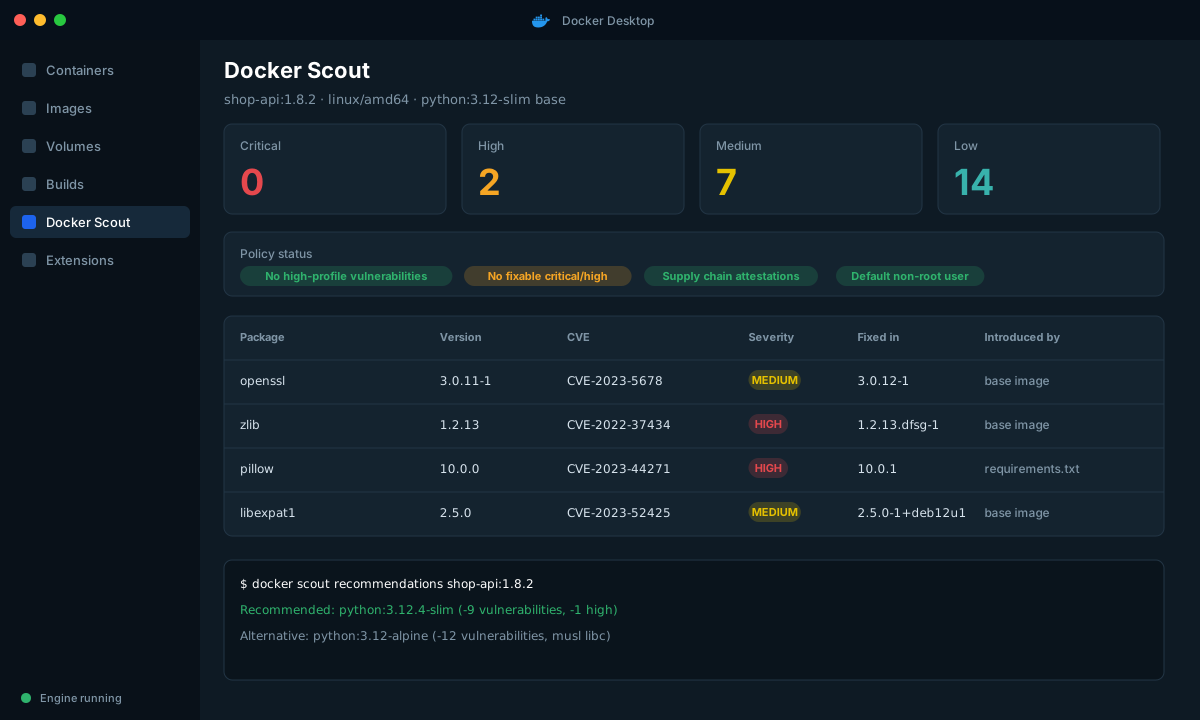
Start with a local look before you automate anything. Docker Scout is built into the Docker CLI.
# One-screen summary: vulnerabilities, base image, recommendations
docker scout quickview shop-api:1.8.2

# Full CVE list, only the severities you care about
docker scout cves --only-severity critical,high shop-api:1.8.2

# What would change if you updated the base image?
docker scout recommendations shop-api:1.8.2

# Compare a new build to what is running in production
docker scout compare --to registry.example.com/shop-api:prod shop-api:1.8.2
Two things in that output change how you work. The introduced by information tells you whether a vulnerability comes from your base image or from your own dependencies, which decides who fixes it. And the recommendations show the effect of a base image bump before you try it.
| Vulnerability source | Typical fix | Owner |
|---|---|---|
| Base image OS package | Bump base image tag or rebuild | Platform or image owner |
| Language dependency | Update lockfile | Service team |
| Build tool left in the final image | Multi-stage build | Service team |
| No fix available upstream | Document and accept, or add a VEX statement | Security and service team |
Step 2: Generate SBOM and provenance at build time
BuildKit can attach attestations to the image it builds. You do not run a separate scanner on the output; the evidence is created at the moment the image is made, which is the only moment it is trustworthy.
docker buildx build \
  --sbom=true \
  --provenance=mode=max \
  --tag registry.example.com/shop-api:1.8.2 \
--push .| Flag | What it records | Notes |
|---|---|---|
--sbom=true | SPDX SBOM of the final image contents | Generated with the BuildKit Syft scanner |
--provenance=mode=min | Builder and basic invocation info | Default for pushed images |
--provenance=mode=max | Full build arguments, source, environment | Use it, but check that you do not put secrets in build args |
That last point matters. Maximum provenance records build arguments. Pass secrets with --secret mounts, never --build-arg, or they end up in an attestation anyone with pull access can read.
# Correct: secret is mounted for one step and never stored in a layer
RUN \
NPM_TOKEN=$(cat /run/secrets/npm_token) npm ciYou can inspect what was attached:
docker buildx imagetools inspect registry.example.com/shop-api:1.8.2 \
  --format '{{ json .SBOM }}'
docker buildx imagetools inspect registry.example.com/shop-api:1.8.2 \
  --format '{{ json .Provenance }}'
Step 3: The GitHub Actions workflow
This workflow builds, scans, compares and pushes. It uses the official actions and keeps the policy decision in one place.
# .github/workflows/image.yml
name: image
on:
  pull_request:
  push:
    branches: [main]

permissions:
  contents: read
  packages: write
  id-token: write        # needed for keyless signing
  pull-requests: write   # lets Scout comment on the PR

env:
  IMAGE: registry.example.com/shop-api

jobs:
  build-scan:
    runs-on: ubuntu-latest
    steps:
      - uses: actions/checkout@v4
      - uses: docker/setup-buildx-action@v3

      - uses: docker/login-action@v3
        with:
          registry: registry.example.com
          username: ${{ secrets.REGISTRY_USER }}
          password: ${{ secrets.REGISTRY_TOKEN }}

      - uses: docker/login-action@v3       # Scout needs Docker Hub credentials
        with:
          username: ${{ secrets.DOCKERHUB_USER }}
          password: ${{ secrets.DOCKERHUB_TOKEN }}

      - id: meta
        uses: docker/metadata-action@v5
        with:
          images: ${{ env.IMAGE }}
          tags: |
            type=sha
            type=ref,event=branch

      - id: build
        uses: docker/build-push-action@v5
        with:
          context: .
          push: ${{ github.event_name != 'pull_request' }}
          load: ${{ github.event_name == 'pull_request' }}
          tags: ${{ steps.meta.outputs.tags }}
          sbom: true
          provenance: mode=max
          cache-from: type=gha
          cache-to: type=gha,mode=max

      # On PRs: fail only on new, fixable critical or high issues vs production
      - name: Scout compare
        if: github.event_name == 'pull_request'
        uses: docker/scout-action@v1
        with:
          command: compare
          image: ${{ steps.meta.outputs.tags }}
          to: ${{ env.IMAGE }}:main
          only-severities: critical,high
          ignore-unchanged: true
          exit-code: true
          github-token: ${{ secrets.GITHUB_TOKEN }}

      # On main: record the full CVE report
      - name: Scout CVEs
        if: github.event_name != 'pull_request'
        uses: docker/scout-action@v1
        with:
          command: cves
          image: ${{ env.IMAGE }}@${{ steps.build.outputs.digest }}
          only-fixed: true
          only-severities: critical,high
          sarif-file: scout.sarif

      - name: Upload SARIF
        if: github.event_name != 'pull_request'
        uses: github/codeql-action/upload-sarif@v3
        with:
          sarif_file: scout.sarif

      - uses: sigstore/cosign-installer@v3
        if: github.event_name != 'pull_request'
      - name: Sign image by digest
        if: github.event_name != 'pull_request'
        run: cosign sign --yes ${{ env.IMAGE }}@${{ steps.build.outputs.digest }}
Two choices in there deserve explanation.
Comparing, not just scanning. compare with ignore-unchanged fails a PR only for vulnerabilities this change introduces. If the base image already has an old medium-severity CVE, your unrelated one-line fix does not get blocked. Blocking everything on every PR trains people to ignore the check or add blanket ignores.
Signing by digest. Tags are mutable. A signature on shop-api:main means nothing after the tag moves. Always sign image@sha256:....
Step 4: Policies
Scout evaluates images against policies, and the defaults cover the basics: no high-profile vulnerabilities, no fixable critical or high vulnerabilities, supply chain attestations present, a non-root default user, and base images that are up to date. Use them as the shared definition of "good" instead of every team inventing its own.
| Default policy | Passes when | Why it earns its place |
|---|---|---|
| No high-profile vulnerabilities | No CVEs from a curated list of widely exploited issues | Cheap and catches the headline problems |
| No fixable critical or high vulnerabilities | Fix exists and is not applied | Actionable, so it rarely needs an exception |
| Supply chain attestations | SBOM and provenance attached | Proves the pipeline ran |
| Default non-root user | Image does not run as root | Limits the damage of a compromise |
| Up-to-date base images | Base tag is the latest for its line | Keeps drift under control |
Start in reporting mode. Show the policy status on a dashboard for a few weeks, fix the cheap failures, then make the important ones blocking. Turning everything on at once produces a wall of red and a rebellion.
Step 5: Verify before you deploy
A signature is only useful if something checks it. For Kubernetes the usual place is an admission controller such as Kyverno or Sigstore policy-controller. The simplest manual check shows the idea:
cosign verify registry.example.com/shop-api@sha256:3b1f... \
  --certificate-identity-regexp '^https://github.com/acme/shop-api/\.github/workflows/image\.yml@refs/heads/main$' \
  --certificate-oidc-issuer https://token.actions.githubusercontent.com
This checks that the image was signed by that specific workflow on the main branch. A signature from a fork, a different workflow or a developer laptop does not match.
As a Kyverno policy in a cluster:
apiVersion: kyverno.io/v1
kind: ClusterPolicy
metadata:
  name: verify-shop-images
spec:
  validationFailureAction: Enforce
  rules:
    - name: verify-signature
      match:
        any:
          - resources: { kinds: [Pod] }
      verifyImages:
        - imageReferences: ["registry.example.com/shop-*"]
          attestors:
            - entries:
                - keyless:
                    issuer: https://token.actions.githubusercontent.com
                    subject: https://github.com/acme/shop-api/.github/workflows/image.yml@refs/heads/main
When a vulnerability has no fix
You will hit CVEs that cannot be fixed, or that cannot be exploited in your use. Do not silence them in a config file nobody reads. Use a VEX (Vulnerability Exploitability eXchange) statement, which records that a CVE is not affecting this product and why, and which Scout can take into account. The discipline that matters is the same either way: a named owner, a reason, and an expiry date.
| Decision | Record | Review |
|---|---|---|
| Fix | Link to the commit | Verify on next scan |
| Not affected | VEX statement with justification | Re-check when the dependency changes |
| Accept risk | Exception with owner and expiry | Expires and returns to the queue |
What this does not solve
- It does not stop a malicious dependency that is not yet in any advisory database.
- Provenance proves where an image came from, not that the source is safe. Keep code review and branch protection in place.
- SBOMs describe the image at build time. Rescan stored images regularly, because new CVEs appear after you ship. Scout and most registries can do this continuously.
Wrap-up
A useful supply chain pipeline is small: build with attestations, compare instead of blindly scanning, sign by digest, and verify at deploy. Each step gives you something you can show an auditor or an incident responder. Start with the PR comparison, since it gives developers fast feedback, and add signing and admission once the scan results are boring.