Foundry IQ Auth, Explained: Managed Identity, OBO, and Everything Between
Foundry IQ's pitch is that your agents get one endpoint for grounded, cited, multi-source context instead of a hand-rolled retrieval stack.
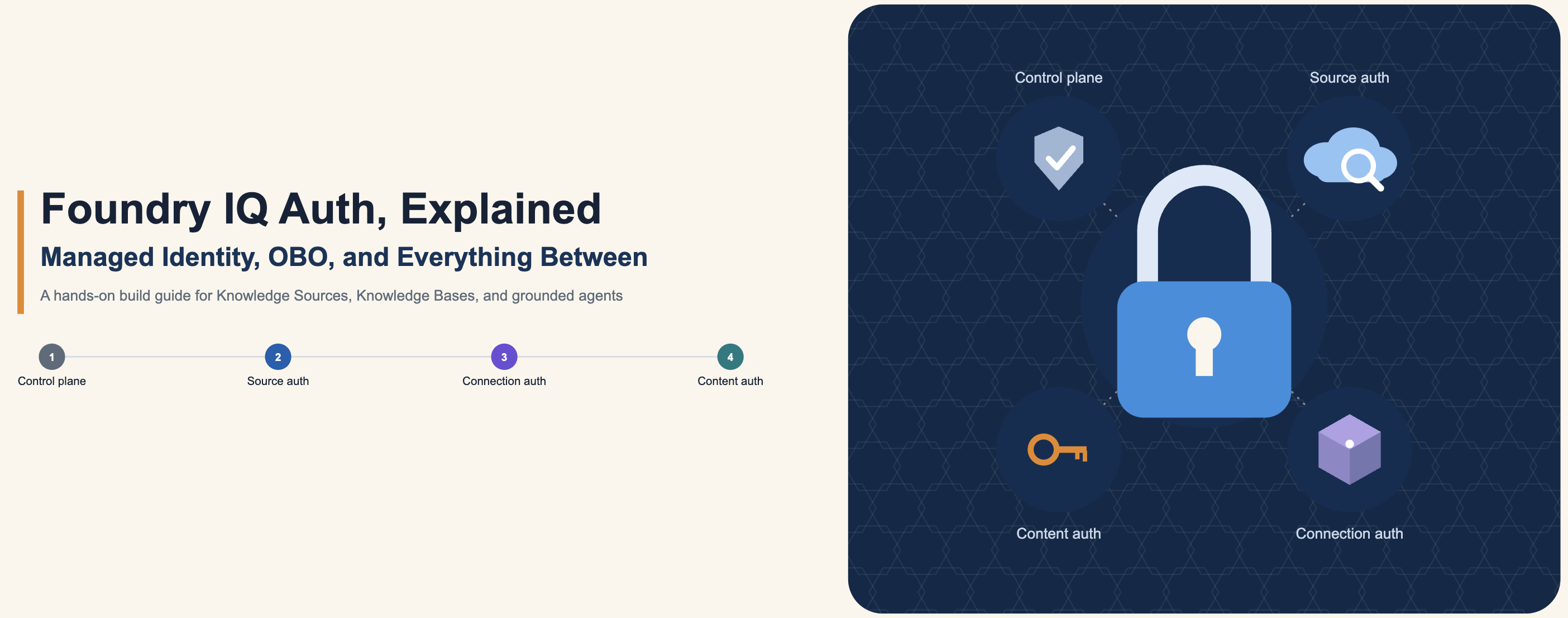
What doesn't get talked about enough is that "one endpoint" is a bit of a simplification. Underneath it, you're actually managing four separate auth surfaces that don't share a security model: the control plane you use to provision resources, the per-Knowledge-Source credentials that vary by source kind, the connection auth between a Knowledge Base and the agent that calls it, and, the one people get wrong most often, whether the content itself respects the permissions of the person asking.
Get any one of these wrong and you usually don't get an error. You get an agent that confidently answers questions using data the requesting user was never supposed to see. This is a hands-on guide to standing up a real Foundry IQ deployment, Knowledge Sources, a Knowledge Base, and both a Foundry Agent and a Microsoft Agent Framework agent grounded against it, built around getting each of those four auth surfaces right instead of defaulting to the admin key that makes the quickstart work.
The mental model first
Three primitives matter here:
- Knowledge Source (KS), a connection to one place your data lives. Could be an existing Azure AI Search index you already own, a file you upload directly, a live Blob container, SharePoint, OneLake, a Fabric data agent, or, notably, an arbitrary external MCP server. Each KS has a
kind, and the kind determines its auth model and ingestion pipeline. - Knowledge Base (KB), a named, reusable object that wraps one or more Knowledge Sources plus a chat model. The KB is what your agents actually talk to. Multiple agents can share one KB.
- Agentic retrieval engine, the thing that makes this more than "call several sources and concatenate." Given a user turn, it decomposes the query into subqueries, plans which KS each subquery should hit, runs them in parallel, reranks with the semantic ranker, and, if you ask it to, synthesizes one cited natural-language answer instead of dumping raw chunks back at you.
Architecturally, indexed sources (Search Index, Blob, OneLake, SharePoint indexed, SQL) get a managed indexing pipeline. Foundry IQ chunks, embeds, and indexes the content for you. Federated sources (Web, remote SharePoint, MCP servers) are queried live at retrieval time, so no copy of the data sits in your index. That distinction matters a lot for cost, freshness, and latency, and it's the first architectural decision you'll make for each data source.
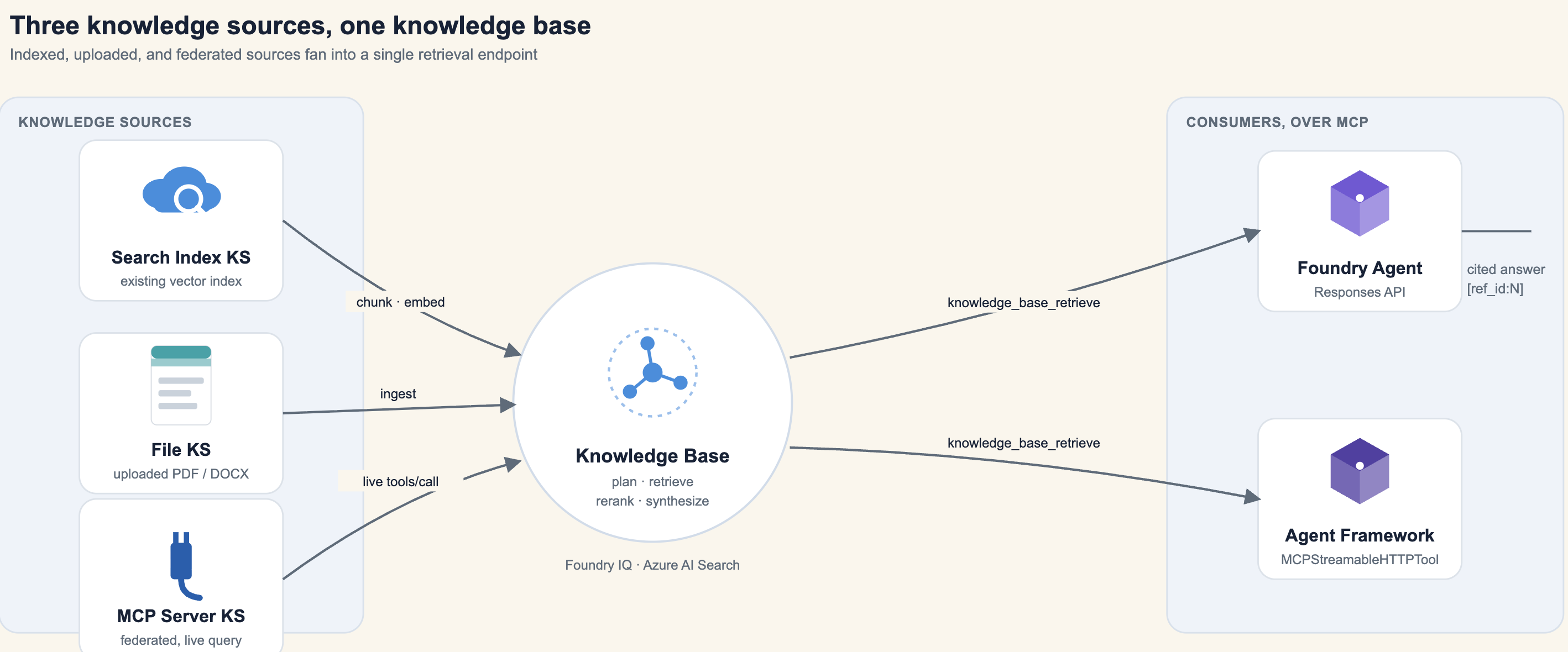
One thing worth being precise about, because "GA" gets thrown around loosely in this space: as of the current preview cycle, Knowledge Bases and the core indexed sources (Search Index, Azure Blob, OneLake, Web) are generally available on the stable REST API surface. Answer synthesis, configurable reasoning effort, document-level permissions, and multi-turn retrieve are still preview-only capabilities on the newer API version. Check current GA-vs-preview status before you commit a production dependency to a specific feature. This space is moving fast.
The four auth surfaces, up front
Before touching any code, it's worth naming these explicitly, because the hands-on steps below each map to one of them.
| Surface | Question it answers | Default | Production choice |
|---|---|---|---|
| Control plane | Who can create or modify KS, KBs, indexes? | AzureKeyCredential (admin key) | DefaultAzureCredential + RBAC roles |
| Knowledge Source auth | How does this specific source authenticate to its backing system? | Varies by kind, same-service key, upload key, or none | Depends on source. Federated sources often need a dedicated connection |
| KB to Agent connection | How does the agent calling the KB authenticate to Search? | Shared admin key on the MCP endpoint | ProjectManagedIdentity connection, scoped per agent |
| Content-level permissions | Does the answer respect what the requesting user is allowed to see? | Nothing. Retrieval ignores identity unless you wire it up | ACL and sensitivity-label ingestion plus an OBO token threaded through every call |
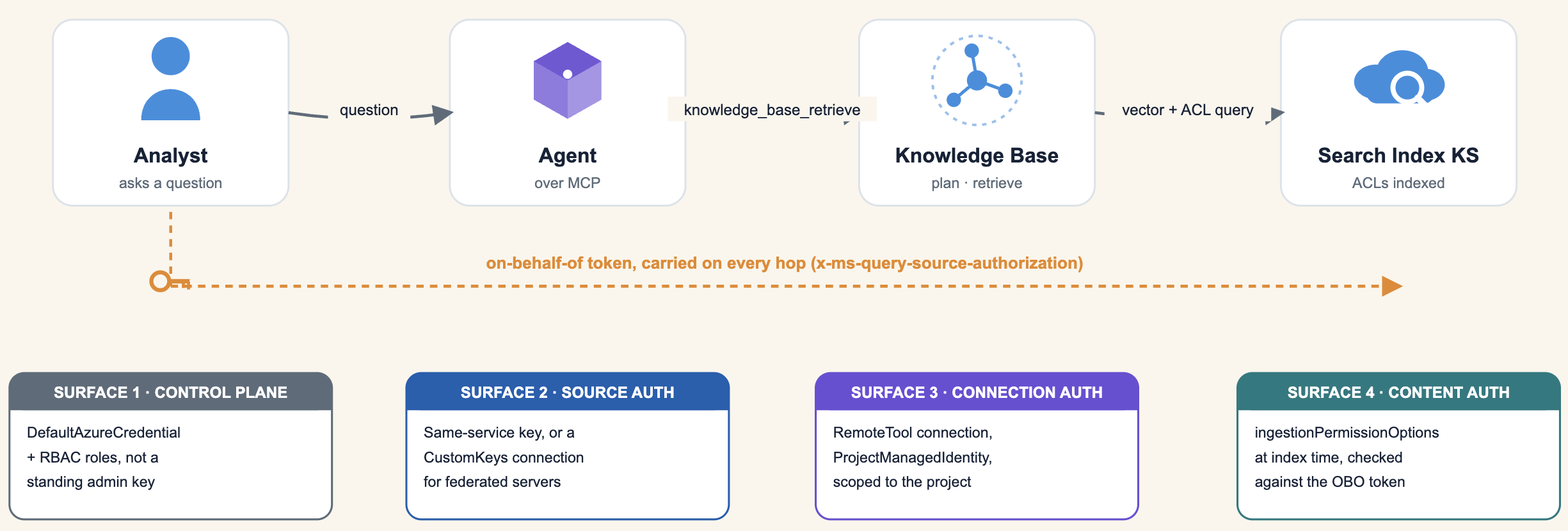
The first three are about who can operate the system. The fourth is about whether the system, once operating correctly, still leaks data across a permission boundary. Most Foundry IQ writeups stop at the third. The fourth is where real incidents happen, so it gets its own section below, after the build steps.
Prerequisites
You need two things provisioned before you write any code:
- An Azure AI Search service (any supported region).
- A Microsoft Foundry project with a chat model deployment (for example
gpt-4.1-miniorgpt-4o) and an embedding model deployment (for exampletext-embedding-3-large).
Everything below assumes Python with the preview azure-search-documents SDK, which is the first SDK version to expose the Knowledge Base and Knowledge Source surface, alongside azure-ai-projects for the Foundry Agent bindings.
pip install "azure-search-documents==12.1.0b1" \
            "azure-ai-projects==2.1.0" \
            "azure-identity>=1.19.0" \
            "agent-framework-core>=0.1.0" \
            "agent-framework-openai>=0.1.0"
Set up your clients once and reuse them everywhere:
from azure.core.credentials import AzureKeyCredential
from azure.search.documents.indexes import SearchIndexClient

SEARCH_ENDPOINT = "https://<your-search-service>.search.windows.net"
SEARCH_API_KEY = "<admin-key>"
AOAI_ENDPOINT = "https://<your-foundry-resource>.openai.azure.com"

credential = AzureKeyCredential(SEARCH_API_KEY)
index_client = SearchIndexClient(endpoint=SEARCH_ENDPOINT, credential=credential)
Notice the credential type. AzureKeyCredential gets you moving fast, but for production you'll want to swap this for DefaultAzureCredential and lean on RBAC (Search Service Contributor, Search Index Data Contributor, Cognitive Services User) instead of a static admin key sitting in an env var. Keep that migration on your list from day one. It's a trivial swap later but a real security debt if you skip it.
Step 1: give a Search Index Knowledge Source something to point at
If you already have a vector index, you can wrap it directly, no re-ingestion needed. But to see the whole pipeline, it helps to stand up a small, production-shaped index: a text field, a vector field on an HNSW profile with an Azure OpenAI vectorizer (so query-time embedding happens server-side, not in your app code), and a semantic configuration, which is a hard requirement since the KB's planner leans on the semantic ranker to rerank candidates before synthesis.
from azure.search.documents.indexes.models import (
    SearchIndex, SimpleField, SearchField, SearchFieldDataType,
    VectorSearch, VectorSearchProfile, HnswAlgorithmConfiguration,
    AzureOpenAIVectorizer, AzureOpenAIVectorizerParameters,
    SemanticSearch, SemanticConfiguration, SemanticPrioritizedFields, SemanticField,
)

vectorizer_params = AzureOpenAIVectorizerParameters(
    resource_url=AOAI_ENDPOINT,
    deployment_name="text-embedding-3-large",
    api_key="<aoai-key>",
    model_name="text-embedding-3-large",
)

index = SearchIndex(
    name="docs-index",
    fields=[
        SimpleField(name="id", type=SearchFieldDataType.String, key=True),
        SearchField(name="chunk", type=SearchFieldDataType.String),
        SearchField(
            name="chunk_vector",
            type=SearchFieldDataType.Collection(SearchFieldDataType.Single),
            vector_search_dimensions=3072,
            vector_search_profile_name="hnsw",
        ),
    ],
    vector_search=VectorSearch(
        profiles=[VectorSearchProfile(name="hnsw", algorithm_configuration_name="alg", vectorizer_name="aoai")],
        algorithms=[HnswAlgorithmConfiguration(name="alg")],
        vectorizers=[AzureOpenAIVectorizer(vectorizer_name="aoai", parameters=vectorizer_params)],
    ),
    semantic_search=SemanticSearch(
        default_configuration_name="semantic",
        configurations=[SemanticConfiguration(
            name="semantic",
            prioritized_fields=SemanticPrioritizedFields(content_fields=[SemanticField(field_name="chunk")]),
        )],
    ),
)
index_client.create_or_update_index(index)
Once the index has documents, wrap it in a SearchIndexKnowledgeSource:
from azure.search.documents.indexes.models import SearchIndexKnowledgeSource, SearchIndexKnowledgeSourceParameters

ks_index = SearchIndexKnowledgeSource(
    name="ks-docs-index",
    description="Existing product docs index.",
    search_index_parameters=SearchIndexKnowledgeSourceParameters(
        search_index_name="docs-index",
        semantic_configuration_name="semantic",
        source_data_fields=[{"name": "id"}, {"name": "chunk"}],
    ),
)
index_client.create_or_update_knowledge_source(ks_index)
One gotcha worth flagging here: the baseFilter you can set on a Search Index KS narrows the queryable subset for every KB that references it, and its semantics are different from a per-call filterAddOn at retrieve time. Don't conflate the two. One is a source-level ceiling, the other is a request-level refinement.
Step 2: upload a file directly, no storage account required
For content that doesn't live in a managed data store, the File KS lets you POST documents straight into Foundry IQ and it handles chunking and embedding for you.
from azure.search.documents.indexes.models import FileKnowledgeSource, FileKnowledgeSourceParameters, KnowledgeSourceIngestionParameters, KnowledgeSourceAzureOpenAIVectorizer

ks_file = FileKnowledgeSource(
    name="ks-uploaded-pdf",
    description="Directly uploaded reference PDF.",
    file_parameters=FileKnowledgeSourceParameters(
        ingestion_parameters=KnowledgeSourceIngestionParameters(
            content_extraction_mode="minimal",
            embedding_model=KnowledgeSourceAzureOpenAIVectorizer(azure_open_ai_parameters=vectorizer_params),
        ),
    ),
)
index_client.create_or_update_knowledge_source(ks_file)

with open("reference.pdf", "rb") as fh:
    uploaded = index_client.upload_knowledge_source_file("ks-uploaded-pdf", fh.read(), filename="reference.pdf")
A gotcha here too: the file upload endpoint is a plain REST route, not the usual OData-style ('name') addressing pattern the rest of the Search API uses. A JSON-only middleware in front rejects binary bodies sent the OData way. If you're calling this from something other than the typed SDK, get the URL shape right or you'll spend longer than you'd like debugging a 415. Also, embedding happens synchronously after upload, so poll the KS status until synchronizationStatus reports active before you query the KB. Querying too early raises a validation error rather than silently returning partial results.
Step 3: federate a live external source over MCP
This is the part that's genuinely new relative to a typical RAG stack. A Knowledge Source can be another MCP server entirely. No copying, no indexing pipeline, every retrieve does a live tools/call against the upstream server.
from azure.search.documents.indexes.models import McpServerKnowledgeSource, McpServerKnowledgeSourceParameters

ks_mcp = McpServerKnowledgeSource(
    name="ks-external-mcp",
    description="Federated live source over MCP.",
    mcp_server_parameters=McpServerKnowledgeSourceParameters(
        server_url="https://learn.microsoft.com/api/mcp",
        tools=[{
            "name": "microsoft_docs_search",
            "outputParsing": {"kind": "auto"},
            "inclusionMode": "reranked",
            "maxOutputTokens": 4096,
        }],
    ),
)
index_client.create_or_update_knowledge_source(ks_mcp)
The tools[].name you specify has to exactly match a tool name the upstream MCP server actually publishes. There's no fuzzy matching. If outputParsing.kind: "auto" fails to infer the right shape for a given server's responses, fall back to explicit "text" or "structured". For servers that require an API key, the canonical pattern is a Foundry CustomKeys connection rather than embedding secrets in the KS definition.
Step 4: assemble the Knowledge Base
The KB is where you decide how hard the planner should work and what shape you want the output in.
from azure.search.documents.indexes.models import KnowledgeBase, KnowledgeBaseAzureOpenAIModel, KnowledgeSourceReference
from azure.search.documents.knowledgebases.models import KnowledgeRetrievalLowReasoningEffort, KnowledgeRetrievalOutputMode

gpt_params = AzureOpenAIVectorizerParameters(
    resource_url=AOAI_ENDPOINT, deployment_name="gpt-4.1-mini",
    api_key="<aoai-key>", model_name="gpt-4.1-mini",
)

kb = KnowledgeBase(
    name="team-kb",
    description="Unified KB over indexed docs, an uploaded file, and a federated MCP source.",
    models=[KnowledgeBaseAzureOpenAIModel(azure_open_ai_parameters=gpt_params)],
    knowledge_sources=[
        KnowledgeSourceReference(name="ks-docs-index"),
        KnowledgeSourceReference(name="ks-uploaded-pdf"),
        KnowledgeSourceReference(name="ks-external-mcp"),
    ],
    retrieval_reasoning_effort=KnowledgeRetrievalLowReasoningEffort(),
    output_mode=KnowledgeRetrievalOutputMode.ANSWER_SYNTHESIS,
    answer_instructions="Answer only from retrieved content. Preserve [ref_id:N] citations.",
)
index_client.create_or_update_knowledge_base(kb)
Two settings are worth deliberating over rather than defaulting blindly:
retrieval_reasoning_effort(minimal,low, ormedium) trades latency and token spend against how thoroughly the planner decomposes and iterates on a query.lowis a reasonable production default. Reach formediumonly when you're seeing the planner short-circuit on genuinely multi-part questions.output_mode:extractiveDatahands you raw ranked chunks, useful if you want to do your own synthesis or need maximum auditability.answerSynthesisgives you a single cited natural-language answer, which is what most agent integrations actually want.
Step 5: query it and watch it actually plan
The payoff case is a query that no single source can answer alone.
from azure.search.documents.knowledgebases import KnowledgeBaseRetrievalClient
from azure.search.documents.knowledgebases.models import KnowledgeBaseRetrievalRequest, KnowledgeBaseMessage, KnowledgeBaseMessageTextContent

retrieval_client = KnowledgeBaseRetrievalClient(endpoint=SEARCH_ENDPOINT, credential=credential, knowledge_base_name="team-kb")

request = KnowledgeBaseRetrievalRequest(
    messages=[KnowledgeBaseMessage(role="user", content=[KnowledgeBaseMessageTextContent(
        text="Compare what our docs say about rate limits with what Microsoft Learn says about retrieval throttling."
    )])],
    include_activity=True,
)
result = retrieval_client.retrieve(request)
Set include_activity=True and you get the planner's trace back: which subqueries it generated, which KS each one hit, and how results were reranked before synthesis. This is worth logging in any non-trivial deployment. It's your debugging surface when the answer looks wrong and you need to know whether the planner queried the wrong source, or queried the right source and got a bad rerank.
Retrieval is also conversation-aware. Append the prior assistant turn and a follow-up user message to messages, and the planner uses that context to scope its next round of subqueries, genuinely useful for the "wait, tell me more about X from that answer" pattern that trips up a lot of naive single-shot RAG.
Step 6: every KB is already an MCP server, use it directly
You don't have to go through the SDK at all. Every Knowledge Base exposes itself at:
{SEARCH_ENDPOINT}/knowledgebases/{KB_NAME}/mcp?api-version=2026-05-01-previewas a standard JSON-RPC 2.0 MCP endpoint (JSON or SSE-streamable), with exactly one tool published, knowledge_base_retrieve. Auth is the same Search admin key on the api-key header, or, for federated sources that need user identity such as Remote SharePoint or WorkIQ, an x-ms-query-source-authorization header carrying an on-behalf-of user token. That means Claude Desktop, VS Code Copilot, a custom script, or any other MCP-capable client can hit the exact same retrieval pipeline your agents use, with zero custom integration code. This is arguably the most senior-engineer-relevant design decision in the whole product. The KB isn't a bespoke API you have to wrap, it's already speaking a protocol your tooling ecosystem understands.
Step 7: ground a Foundry Agent
Wiring a KB into the Foundry Agent Service is a three-step dance. Create a RemoteTool project connection pointing at the KB's MCP URL, create an agent declaring an mcp tool against that connection with knowledge_base_retrieve allow-listed, then drive it through the Responses API.
from azure.ai.projects import AIProjectClient
from azure.ai.projects.models import MCPTool, PromptAgentDefinition
from azure.identity import DefaultAzureCredential

project_client = AIProjectClient(endpoint="<foundry-project-endpoint>", credential=DefaultAzureCredential())

mcp_tool = MCPTool(
    server_label="team-kb",
    server_url=f"{SEARCH_ENDPOINT}/knowledgebases/team-kb/mcp?api-version=2026-05-01-preview",
    require_approval="never",
    allowed_tools=["knowledge_base_retrieve"],
    project_connection_id="team-kb-connection",  # created via a RemoteTool connection beforehand
)

agent_def = PromptAgentDefinition(
    model="gpt-4.1-mini",
    instructions="Always call knowledge_base_retrieve before answering. Preserve [ref_id:N] citations.",
    tools=[mcp_tool],
)
project_client.agents.create_version(agent_name="support-agent", definition=agent_def)

openai_client = project_client.get_openai_client()
conversation = openai_client.conversations.create()
response = openai_client.responses.create(
    conversation=conversation.id,
    input="What's our current rate limit policy?",
    extra_body={"agent_reference": {"name": "support-agent", "type": "agent_reference"}},
)
Use authType=ProjectManagedIdentity on the connection so the project authenticates to Search as itself, rather than storing a per-user token on a shared connection object. That covers this auth surface, whether the agent can call the KB at all. It says nothing about whether the content it retrieves respects the permissions of whoever's talking to the agent. That's a separate mechanism, covered in full below.
Step 8: or plug it into Microsoft Agent Framework instead
If you're not using Foundry Agent Service, the Agent Framework's MCPStreamableHTTPTool connects to the same endpoint directly:
from agent_framework import Agent, MCPStreamableHTTPTool
from agent_framework_openai import OpenAIChatClient
import httpx

mcp_http = httpx.AsyncClient(headers={"api-key": SEARCH_API_KEY, "Accept": "application/json, text/event-stream"})

async with MCPStreamableHTTPTool(
    name="team_kb",
    url=f"{SEARCH_ENDPOINT}/knowledgebases/team-kb/mcp?api-version=2026-05-01-preview",
    http_client=mcp_http,
    allowed_tools=["knowledge_base_retrieve"],
    load_prompts=False,  # the KB MCP server is stateless, don't try prompts/list
) as kb_tool:
    agent = Agent(
        client=OpenAIChatClient(azure_endpoint=AOAI_ENDPOINT, api_key="<key>", api_version="preview", model="gpt-4.1-mini"),
        name="SupportAgent",
        instructions="Call team_kb-knowledge_base_retrieve before answering. Preserve citations.",
        tools=kb_tool,
    )
    response = await agent.run("What's our current rate limit policy?")
load_prompts=False isn't optional decoration. The KB's MCP server doesn't implement prompts/list, and frameworks that call it eagerly on connect will error out if you don't disable it explicitly.
Surface 4: making retrieval actually respect who's asking
This is the part worth slowing down for, because it's the one gap between "the demo works" and "this is safe to point at real enterprise content."
By default, a Knowledge Base retrieves without any notion of the requesting user. If your Search Index KS was built over a SharePoint site with document-level permissions, and you don't do anything further, Foundry IQ will happily surface a chunk from a document the asking user has no access to. The vector index doesn't know who's asking, and the KB won't stop it for you. Getting this right is two separate steps, and skipping either one leaves the gap open.
Step A, get permission metadata into the index at ingestion time. For indexed sources that support full ACLs, ADLS Gen2 and SharePoint (indexed), set ingestionPermissionOptions to include the identity fields you need:
search_index_parameters = SearchIndexKnowledgeSourceParameters(
    search_index_name="docs-index",
    semantic_configuration_name="semantic",
    # pulls group/user ACLs and sensitivity labels into the index alongside content
    ingestion_permission_options=["groupIds", "userIds", "sensitivityLabel"],
)
Blob and OneLake only carry sensitivityLabel. They don't support full ACL ingestion, so document-level access control on those sources has to be enforced elsewhere in your architecture (container-level access, for instance, or just don't put mixed-sensitivity content in a single Blob-backed KS).
Step B, thread the requesting user's identity through every retrieve call. Indexed metadata sits inert until a request carries an identity to check it against. That identity travels as an on-behalf-of (OBO) token:
request = KnowledgeBaseRetrievalRequest(
    messages=[...],
    include_activity=True,
    # the requesting user's OBO token, checked against ACLs indexed in Step A
    x_ms_query_source_authorization=user_obo_token,
)
Over the KB's MCP endpoint, the same token goes on the x-ms-query-source-authorization header rather than a request field. Either way, it's the piece that turns "we indexed who can see this" into "we actually enforced it for this specific call." If your agent runtime pools requests behind a single service identity and doesn't propagate the calling user's token down to the retrieve call, Steps A and B are both true and enforcement still doesn't happen. The failure mode is silent, not an error.
The same OBO token is what governs federated sources with per-user semantics, Remote SharePoint and WorkIQ, since there's no indexed copy to attach ACLs to in the first place. The upstream system checks the token itself on every live query.
A concrete failure mode worth testing for: stand up a KB over content with mixed permissions, query it as two users with different access, and diff the retrieved chunks and citations. If the low-privilege user ever gets a chunk from a document the high-privilege user's account owns, you've got a Step A or Step B gap. It's worth making this diff test a permanent fixture in CI for any KB backed by access-controlled content, not a one-time manual check.
Surfaces 1 through 3, hardened: a checklist
- Control plane. Swap
AzureKeyCredentialforDefaultAzureCredentialand grant Search Service Contributor (provisioning), Search Index Data Contributor (data-plane read and write), and Cognitive Services User (Foundry model access) instead of holding a standing admin key in an env var. - Knowledge Source auth. Same-service KS kinds (Search Index, File) ride the Search service's own credential, nothing extra to manage. Federated sources that need a key, an MCP server behind auth, a data source needing a shared secret, should go through a Foundry
CustomKeysconnection rather than a literal string in the KS definition, so the secret is rotatable and auditable independently of your KS config. - KB to Agent connection. Use
authType=ProjectManagedIdentityon theRemoteToolconnection so the agent authenticates to Search as the project's own identity, scoped to that project, not a shared key that every agent in the tenant could also use if they found it. This is the difference between "an agent can call this KB" and "anyone with this string can call every KB on the service." - GA vs. preview. Knowledge Bases and core indexed sources (Search Index, Blob, OneLake, Web) are GA on the stable API. Document-level permissions, answer synthesis, and multi-turn retrieve are still preview-only as of this writing. Don't let a preview-only permissions feature be the only thing standing between your KB and an access-control gap. Pin your API version deliberately and track when it goes GA.
- Observability.
include_activity=Trueon every retrieve call gives you the planner's trace, which KS got queried, with what, and that's your primary tool for confirming a permission-scoped query actually stayed scoped, not just for debugging relevance.
Where this leaves you
The interesting engineering bet Foundry IQ is making isn't the managed indexing pipeline. That's table stakes at this point. It's that the Knowledge Base's interface is MCP, not a bespoke SDK surface, and that permission enforcement is a first-class, if opt-in, part of that interface via ACL ingestion and OBO propagation. That combination is also exactly where the risk concentrates. A protocol that's trivially easy for any MCP client to call is only as safe as the identity you remember to attach to every single request. If you're already committed to Azure AI Search and Microsoft Foundry, treat Steps A and B above as non-negotiable for any KB backed by access-controlled content, not an optional hardening pass you get to later. If you're not on Azure, the pattern is worth stealing regardless of platform: index permission metadata alongside content, and make every retrieval call carry the identity it's answering on behalf of.
References
- Microsoft Learn. "What is Foundry IQ?" learn.microsoft.com/en-us/azure/foundry/agents/concepts/what-is-foundry-iq
- Microsoft Foundry Blog. "Foundry IQ: Build smarter agents faster with unified knowledge and serverless retrieval." devblogs.microsoft.com/foundry/build-smarter-agents-faster-with-foundry-iq
- Azure AI Search Team. "Foundry IQ: Unlock knowledge retrieval for agents." Microsoft Tech Community. techcommunity.microsoft.com/blog/azure-ai-foundry-blog/foundry-iq-unlocking-ubiquitous-knowledge-for-agents/4470812
- Sunavala, Farzad. "Mastering Foundry IQ." Microsoft Foundry Forgebook. microsoft-foundry.github.io/forgebook/notebook/mastering-foundry-iq
- Serra, James. "Making Sense of Microsoft's AI Strategy: Work IQ, Fabric IQ, Foundry IQ." jamesserra.com/archive/2026/02/making-sense-of-microsofts-ai-strategy-work-iq-fabric-iq-foundry-iq