Amazon OpenSearch Vector Search Explained for RAG Systems
In this article, we will understand how vector search works in Amazon OpenSearch and how to use it as the retrieval layer in a Retrieval-Augmented Generation (RAG) system. The article is meant for software engineers. We will not stop at theory. We will build a small, working example that you can run on your own machine and follow along step by step.
By the end, you will have a small document search service that takes a user question, finds the most relevant text using vector similarity, and prepares the context that you can pass to a language model.
Let us begin.
What is a RAG system, in short
A RAG system has two main parts. The first part is retrieval. When a user asks a question, we search a knowledge base and pull out the most relevant pieces of text. The second part is generation. We pass these pieces of text, along with the question, to a language model so that the model can answer using real, grounded information.
The quality of a RAG system depends heavily on the retrieval part. If retrieval returns the wrong text, the language model will produce a wrong or vague answer. This is the reason vector search matters. It allows us to retrieve text based on meaning, not only on keyword matching.
Why we need vector search
Traditional keyword search matches exact words. If the user searches for "car" and the document says "automobile", a keyword search may miss it. Vector search solves this problem.
In vector search, we first convert each piece of text into a list of numbers called an embedding. Texts with similar meaning produce embeddings that are close to each other in vector space. When a user asks a question, we convert the question into an embedding as well, and then we find the stored embeddings that are nearest to it. This is called nearest neighbour search.
Amazon OpenSearch supports this through its k-NN (k-nearest neighbour) feature. We store embeddings in a special field type called knn_vector, and OpenSearch builds an index that can search through millions of vectors quickly.
How Amazon OpenSearch performs vector search
Amazon OpenSearch supports two broad approaches: exact nearest neighbour search and approximate nearest neighbour (ANN) search. Exact search compares the query against every stored vector and is accurate but slow on large data. ANN search trades a small amount of accuracy for a large gain in speed, which is what most production RAG systems use.
For ANN, Amazon OpenSearch provides different engines. An engine is the underlying library that builds and searches the vector index. The three engines are FAISS, Lucene, and NMSLIB. Each engine implements one or more algorithms. The two algorithms you will see most often are HNSW (Hierarchical Navigable Small World) and IVF (Inverted File).
The following table compares the three engines.
| Engine | Algorithms supported | Filtering | Status | Best suited for |
|---|---|---|---|---|
| FAISS | HNSW and IVF | Efficient filtering (HNSW from version 2.9, IVF from 2.10) | Active and commonly recommended | Large data sets, memory tuning, and vector compression |
| Lucene | HNSW | Efficient filtering built in | Active | Smaller deployments and workloads that need metadata filtering |
| NMSLIB | HNSW | Pre-filtering and post-filtering only | Deprecated, kept for older indexes | Legacy indexes created in earlier versions |
For new projects, FAISS and Lucene are the recommended choices. NMSLIB is deprecated, so please do not select it for new work. In our tutorial we will use the FAISS engine with the HNSW algorithm, because it is a good default for RAG workloads.
The knn_vector field supports up to 16,000 dimensions, and each dimension is stored as a 32-bit float by default. The number of dimensions is decided by the embedding model you choose. For example, the model we will use in this tutorial produces 384 dimensions.
The architecture of our RAG system
Before writing code, let us look at the full picture. There are two paths. The ingestion path runs once (or whenever your data changes) and fills the index. The query path runs every time a user asks a question.
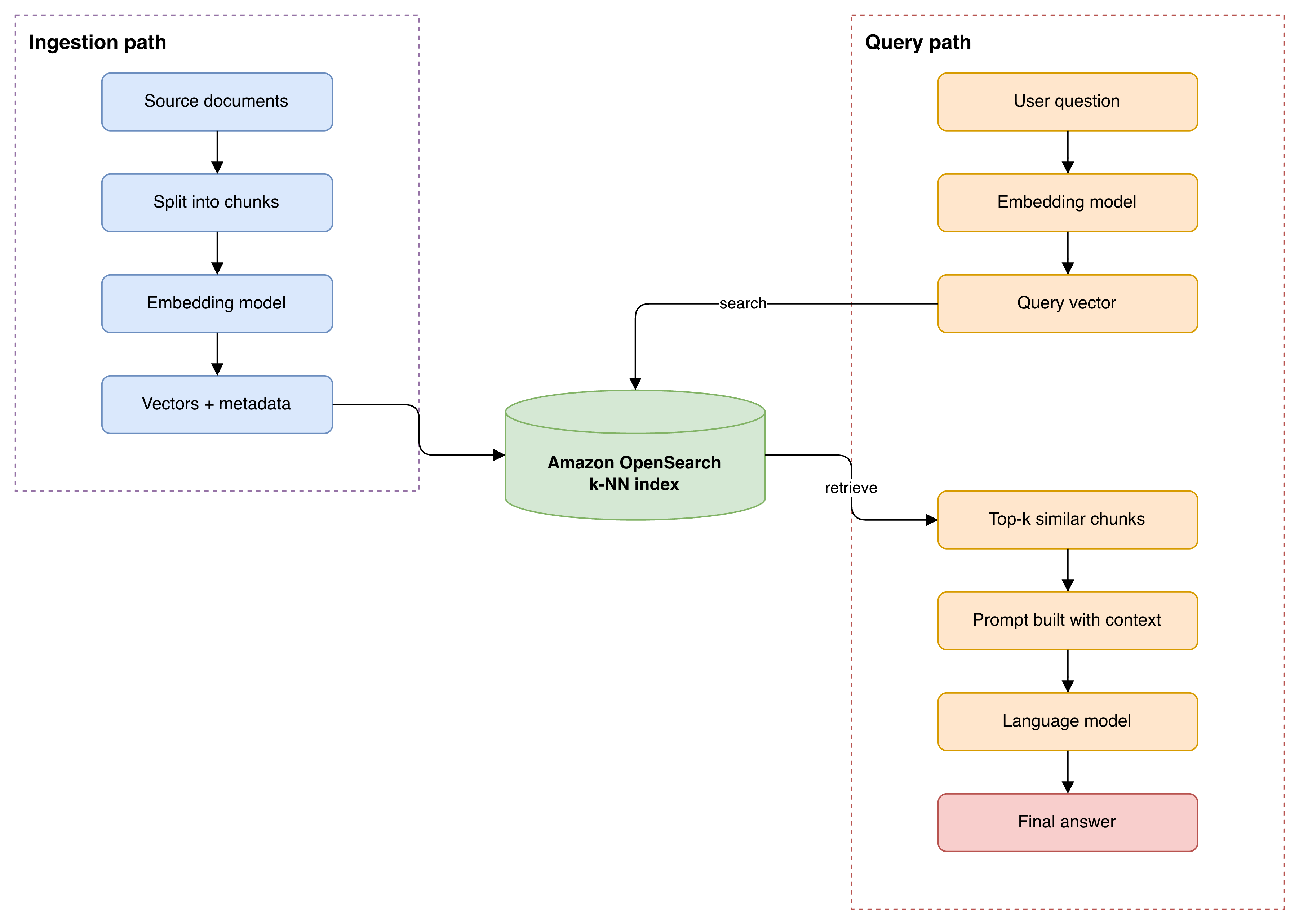
Please note one important detail. The same embedding model must be used in both paths. If you embed your documents with one model and your queries with another, the vectors will not be comparable, and the search results will be meaningless.
The data model
When we store a document for RAG, we usually do not store the full document as one record. We split it into smaller chunks, because a smaller chunk gives more focused retrieval and fits better inside the language model prompt. Each chunk becomes one record in the OpenSearch index, and each record holds the chunk text, its embedding, and some metadata for tracing the result back to its source.
The following entity relationship diagram shows how a source document relates to chunks, and how each chunk is stored as one vector record in OpenSearch.
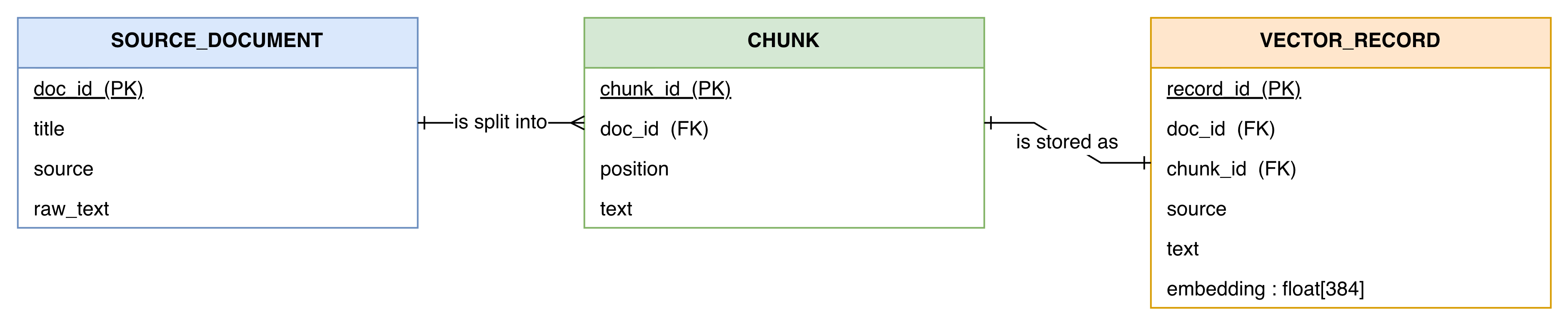
In our small example, our documents are already short, so we will treat each document as a single chunk. In a real system you would add a chunking step, but the structure of the index will remain the same.
Hands-on tutorial
Now we will build the system. I am assuming you have Docker and Python (version 3.9 or above) installed on your machine.
We will run OpenSearch locally using Docker. This is important to understand: Amazon OpenSearch Service is the managed version of OpenSearch, and the API is the same. So the code we write against a local OpenSearch will work against an Amazon OpenSearch Service domain with only a change in the connection settings. I will show you that change at the end.
Step 1: Run OpenSearch locally
Run the following command. It starts a single-node OpenSearch cluster. Recent OpenSearch versions require you to set an initial admin password, so we provide one through an environment variable.
docker run -d \
  --name opensearch-rag \
  -p 9200:9200 -p 9600:9600 \
  -e "discovery.type=single-node" \
  -e "OPENSEARCH_INITIAL_ADMIN_PASSWORD=Your-Strong-Password123!" \
  opensearchproject/opensearch:2.17.0
After a few seconds, check that it is running:
curl -k -u admin:'Your-Strong-Password123!' https://localhost:9200You should receive a JSON response that includes the cluster name and version. The -k flag tells curl to accept the self-signed certificate, which is fine for local testing.
Step 2: Create the k-NN index
Now we create an index that has a knn_vector field. We must enable k-NN at the index level and define the method (the algorithm, the engine, and its parameters).
PUT /rag-docs
{
  "settings": {
    "index": {
      "knn": true,
      "knn.algo_param.ef_search": 100
    }
  },
  "mappings": {
    "properties": {
      "embedding": {
        "type": "knn_vector",
        "dimension": 384,
        "method": {
          "name": "hnsw",
          "space_type": "innerproduct",
          "engine": "faiss",
          "parameters": {
            "ef_construction": 128,
            "m": 16
          }
        }
      },
      "doc_id": { "type": "keyword" },
      "source": { "type": "keyword" },
      "text":   { "type": "text" }
    }
  }
}
Let me explain the choices here. The dimension is 384 because that is the output size of our embedding model. The space_type is innerproduct. We will produce normalised embeddings, and for unit-length vectors the inner product is equal to cosine similarity. This is a common and reliable pattern. The HNSW parameters m and ef_construction control the structure of the graph, and ef_search controls how thoroughly the graph is searched at query time.
The next table explains these parameters and their trade-offs.
| Parameter | Where it is set | What it controls | Trade-off |
|---|---|---|---|
m | Index mapping (method) | Number of connections each node keeps in the HNSW graph | Higher value gives better recall but uses more memory |
ef_construction | Index mapping (method) | Number of candidate neighbours examined while building the graph | Higher value gives a better graph but slows down indexing |
ef_search | Index settings | Number of candidate neighbours examined during a query | Higher value gives better recall but slows down each search |
space_type | Index mapping (method) | The distance metric, such as l2, innerproduct, or cosinesimil | Must match the way your embeddings are produced |
The default values (m is 16, ef_construction is around 128, ef_search is 100) are a reasonable starting point. You can tune them later based on your recall and latency requirements.
Step 3: Connect, embed, and index the documents
Install the required Python libraries:
pip install opensearch-py sentence-transformersNow we write a Python script. First we connect to OpenSearch, then we load the embedding model, then we embed a few documents and store them.
from opensearchpy import OpenSearch, helpers
from sentence_transformers import SentenceTransformer

# 1. Connect to the local OpenSearch cluster
client = OpenSearch(
    hosts=[{"host": "localhost", "port": 9200}],
    http_auth=("admin", "Your-Strong-Password123!"),
    use_ssl=True,
    verify_certs=False,   # local self-signed certificate
)

# 2. Load the embedding model (produces 384-dimensional vectors)
model = SentenceTransformer("all-MiniLM-L6-v2")

# 3. Our small knowledge base
documents = [
    {"doc_id": "1", "source": "billing-faq",
     "text": "You can update your payment method from the account settings page under Billing."},
    {"doc_id": "2", "source": "billing-faq",
     "text": "Refunds are processed within five to seven business days to the original payment method."},
    {"doc_id": "3", "source": "shipping-faq",
     "text": "Standard delivery takes three to five working days within the country."},
    {"doc_id": "4", "source": "account-faq",
     "text": "To reset your password, click the forgot password link on the login screen."},
    {"doc_id": "5", "source": "shipping-faq",
     "text": "International orders may take up to fourteen working days depending on customs."},
]

# 4. Create embeddings. We normalise them so inner product equals cosine similarity.
texts = [d["text"] for d in documents]
embeddings = model.encode(texts, normalize_embeddings=True)

# 5. Build the bulk request and index everything
actions = []
for doc, vector in zip(documents, embeddings):
    actions.append({
        "_index": "rag-docs",
        "_source": {
            "doc_id": doc["doc_id"],
            "source": doc["source"],
            "text": doc["text"],
            "embedding": vector.tolist(),
        },
    })

helpers.bulk(client, actions)
client.indices.refresh(index="rag-docs")
print("Indexed", len(documents), "documents.")
When you run this script, it will index five small documents. In a real project you would read documents from files or a database, split them into chunks, and index thousands or millions of records using the same helpers.bulk approach.
Step 4: Search using a query vector
Now we write the retrieval function. We embed the user question with the same model, then we run a k-NN query. The query asks OpenSearch to return the k nearest vectors to our query vector.
def search(question, k=3):
    # Embed the question with the same model and normalisation
    query_vector = model.encode([question], normalize_embeddings=True)[0]

    body = {
        "size": k,
        "query": {
            "knn": {
                "embedding": {
                    "vector": query_vector.tolist(),
                    "k": k,
                }
            }
        },
    }

    response = client.search(index="rag-docs", body=body)
    results = []
    for hit in response["hits"]["hits"]:
        results.append({
            "score": hit["_score"],
            "source": hit["_source"]["source"],
            "text": hit["_source"]["text"],
        })
    return results


for item in search("how do I get my money back", k=3):
    print(round(item["score"], 4), "|", item["source"], "|", item["text"])
Notice that the question uses the words "get my money back", but none of the documents contain these exact words. The most relevant document talks about refunds. Because vector search compares meaning and not keywords, the refund document should appear at the top of the results with the highest score. This is the behaviour we want in a RAG system.
Step 5: Build the RAG prompt
The retrieval part is now complete. The final step is to take the retrieved text and build a prompt for the language model. We do not call any specific model here, because you may use Amazon Bedrock, an Anthropic model, an OpenAI model, or any other. We only prepare the input.
def build_prompt(question, k=3):
    hits = search(question, k=k)
    context = "\n\n".join(f"- {hit['text']}" for hit in hits)

    prompt = (
        "You are a support assistant. Use only the context below to answer "
        "the question. If the answer is not in the context, say that you do "
        "not have enough information.\n\n"
        f"Context:\n{context}\n\n"
        f"Question: {question}\n"
        "Answer:"
    )
    return prompt


print(build_prompt("how do I get my money back"))
The output is a prompt that contains the question and the most relevant pieces of text. You would now send this prompt to your language model, and the model would generate a grounded answer. This is the complete retrieval-augmented generation flow, with Amazon OpenSearch acting as the vector store and retriever.
Running this against Amazon OpenSearch Service
So far we have used a local cluster. To run the exact same code against an Amazon OpenSearch Service domain, you only need to change how the client connects. If your domain uses IAM-based access, you sign your requests with your AWS credentials. The rest of the code (creating the index, indexing, and searching) stays the same.
from opensearchpy import OpenSearch, RequestsHttpConnection, AWSV4SignerAuth
import boto3

host = "my-domain.us-east-1.es.amazonaws.com"   # your domain endpoint, no https://
region = "us-east-1"
service = "es"   # use "aoss" for Amazon OpenSearch Serverless

credentials = boto3.Session().get_credentials()
auth = AWSV4SignerAuth(credentials, region, service)

client = OpenSearch(
    hosts=[{"host": host, "port": 443}],
    http_auth=auth,
    use_ssl=True,
    verify_certs=True,
    connection_class=RequestsHttpConnection,
    pool_maxsize=20,
)
One point to remember: if you use Amazon OpenSearch Serverless vector search collections, the service value is aoss, and these collections support only the HNSW algorithm with the FAISS engine. They do not support the Lucene engine or the IVF algorithm. For a managed OpenSearch domain (not serverless), all three engines are available.
A few practical notes for production
When you move from this small example to a real system, please keep the following points in mind. Choose your embedding model carefully, because it decides the dimension of your vectors and the quality of your retrieval. Add a chunking step so that long documents are split into focused passages. If you need to filter results by metadata, such as searching only within a particular source, use the efficient filtering support in the FAISS or Lucene engine. Finally, monitor memory usage, because vector indexes are kept in memory; if memory becomes a concern, look at byte vectors and quantization, which reduce the storage size of each vector.
Conclusion
We have seen what vector search is, why a RAG system needs it, and how Amazon OpenSearch provides it through the knn_vector field and the FAISS, Lucene, and NMSLIB engines. We then built a small but complete example: we ran OpenSearch, created a k-NN index, embedded and indexed a few documents, searched them by meaning, and assembled a RAG prompt. The same code runs against Amazon OpenSearch Service with only a change in the connection settings.
You can now extend this example with your own documents, a chunking step, and a language model of your choice to build a full RAG application.
References
- Amazon OpenSearch Service vector database capabilities revisited — AWS Big Data Blog: https://aws.amazon.com/blogs/big-data/amazon-opensearch-service-vector-database-capabilities-revisited/
- Approximate k-NN search — OpenSearch Documentation: https://docs.opensearch.org/latest/vector-search/vector-search-techniques/approximate-knn/
- Methods and engines — OpenSearch Documentation: https://docs.opensearch.org/latest/mappings/supported-field-types/knn-methods-engines/
- k-NN vector field type — OpenSearch Documentation: https://docs.opensearch.org/latest/mappings/supported-field-types/knn-vector/
- Efficient filters in the OpenSearch vector engine — OpenSearch Blog: https://opensearch.org/blog/efficient-filters-in-knn/
- Signing HTTP requests to Amazon OpenSearch Service (Python client) — AWS Documentation: https://docs.aws.amazon.com/opensearch-service/latest/developerguide/request-signing.html
- Working with vector search collections (Amazon OpenSearch Serverless) — AWS Documentation: https://docs.aws.amazon.com/opensearch-service/latest/developerguide/serverless-vector-search.html
- Memory-optimized vectors — OpenSearch Documentation: https://docs.opensearch.org/latest/mappings/supported-field-types/knn-memory-optimized/