Kubernetes Agent Sandboxes: Security Hardening with gVisor, NetworkPolicy and Pod Security
Agents that write and run code are useful, and they are a security problem with a new shape. The code did not come from your developers, it was produced by a model from text that may have come from the internet, and you are about to execute it. Treat every task as hostile until proven otherwise. A sandbox is not a nice-to-have. It is the product's main safety control.
Kubernetes is a reasonable place to build one, because it already has the pieces: isolation primitives, admission control, network policy, quotas and a scheduler. It is also easy to get wrong, because the defaults favour convenience. A default pod has a service account token, runs as whatever the image says, can reach the whole cluster network and the cloud metadata service, and shares a kernel with every other pod on the node.
This post builds a sandbox in layers, so that when one layer fails the next one holds.
Threat model first
| Threat | Example | Layer that should stop it |
|---|---|---|
| Kernel exploit from inside the container | Generated code triggers a container escape CVE | Runtime isolation (gVisor, Kata) |
| Privilege escalation | Code tries to gain root or extra capabilities | Pod Security restricted, drop capabilities |
| Credential theft | Reads the service account token or cloud metadata | No token mount, metadata egress blocked, workload identity scoping |
| Lateral movement | Scans and connects to other pods and services | Default-deny NetworkPolicy |
| Data exfiltration | Sends the user's files to an external host | Egress allowlist, no direct internet |
| Resource abuse | Fork bomb, crypto mining, filling disk | Limits, quotas, deadlines, ephemeral storage caps |
| Persistence | Leaves a process or file for the next task | One pod per task, short TTL, no shared volumes |
| Policy bypass | Someone creates a pod without the sandbox settings | Admission policy that rejects it |
Architecture
The design principle: the sandbox pod is a dead end. It can compute, and it can talk to one controlled gateway. Everything with real power lives outside it.
Layer 1: Runtime isolation with gVisor
Containers share the host kernel. A kernel vulnerability reachable from a container is a path to the node. For untrusted code, add a second boundary. gVisor implements a user-space kernel that intercepts syscalls, so the application talks to gVisor and not to the host kernel. Kata Containers takes another route and runs each pod in a lightweight VM. Both plug into Kubernetes through a RuntimeClass.
apiVersion: node.k8s.io/v1
kind: RuntimeClass
metadata:
  name: gvisor
handler: runsc
scheduling:
  nodeSelector:
    sandbox.example.com/runtime: gvisor
  tolerations:
    - key: sandbox.example.com/untrusted
      operator: Exists
      effect: NoSchedule
On GKE, GKE Sandbox provides this for you on node pools with sandboxing enabled. On EKS and AKS you install the runtime on dedicated node pools yourself, or use a VM-based runtime. Whichever you choose, put sandbox pods on dedicated nodes, labelled and tainted, so untrusted workloads never share a kernel with your own services.
| Option | Isolation | Cost | Compatibility |
|---|---|---|---|
| Plain container | Shared kernel, namespaces only | Lowest | Full |
| gVisor | User-space kernel, reduced host syscall surface | Some syscall and I/O overhead | Most apps, some syscalls unsupported |
| Kata Containers | Lightweight VM per pod | Higher memory and start time | Broad, needs nested virtualization or bare metal |
| Dedicated node pool | Separates blast radius by node | Extra nodes | Full, combine with the options above |
Test your real workloads under the runtime you pick. Some Python native extensions, GPU access and unusual syscalls behave differently under gVisor, and you want to learn that before launch.
Layer 2: Pod hardening
The sandbox pod spec drops everything it does not need. A Job gives you a deadline and automatic cleanup:
apiVersion: batch/v1
kind: Job
metadata:
  generateName: task-
  namespace: agent-sandbox
  labels: { app: sandbox-task }
spec:
  backoffLimit: 0
  activeDeadlineSeconds: 900          # kill after 15 minutes no matter what
  ttlSecondsAfterFinished: 60         # clean up quickly
  template:
    metadata:
      labels: { app: sandbox-task }
    spec:
      runtimeClassName: gvisor
      restartPolicy: Never
      automountServiceAccountToken: false
      hostUsers: false                # user namespace, check support on your version
      enableServiceLinks: false
      securityContext:
        runAsNonRoot: true
        runAsUser: 65532
        runAsGroup: 65532
        fsGroup: 65532
        seccompProfile: { type: RuntimeDefault }
      containers:
        - name: runner
          image: registry.example.com/sandbox-runner@sha256:...
          command: ["python", "/runner/run_task.py"]
          securityContext:
            allowPrivilegeEscalation: false
            readOnlyRootFilesystem: true
            capabilities: { drop: ["ALL"] }
          resources:
            requests: { cpu: 500m, memory: 512Mi, ephemeral-storage: 256Mi }
            limits:   { cpu: "1",  memory: 1Gi,  ephemeral-storage: 1Gi }
          volumeMounts:
            - { name: workspace, mountPath: /workspace }
            - { name: tmp,       mountPath: /tmp }
      volumes:
        - name: workspace
          emptyDir: { sizeLimit: 512Mi }
        - name: tmp
emptyDir: { medium: Memory, sizeLimit: 64Mi }| Setting | What it blocks |
|---|---|
runtimeClassName: gvisor | Direct host kernel exposure |
automountServiceAccountToken: false | Stealing a token to call the Kubernetes API |
runAsNonRoot, allowPrivilegeEscalation: false, drop: ALL | Privilege escalation and capability abuse |
readOnlyRootFilesystem | Modifying the image, dropping binaries into system paths |
seccompProfile: RuntimeDefault | Dangerous syscalls |
| CPU, memory and ephemeral storage limits | Resource exhaustion on the node |
activeDeadlineSeconds, ttlSecondsAfterFinished | Long-running or lingering tasks |
emptyDir with sizeLimit | Disk filling, state surviving between tasks |
Layer 3: Make the namespace refuse bad pods
Per-pod settings only help if they cannot be forgotten. Use Pod Security Admission to set a floor for the whole namespace:
apiVersion: v1
kind: Namespace
metadata:
  name: agent-sandbox
  labels:
    pod-security.kubernetes.io/enforce: restricted
    pod-security.kubernetes.io/enforce-version: latest
    pod-security.kubernetes.io/audit: restricted
    pod-security.kubernetes.io/warn: restricted
    gateway-access: "false"
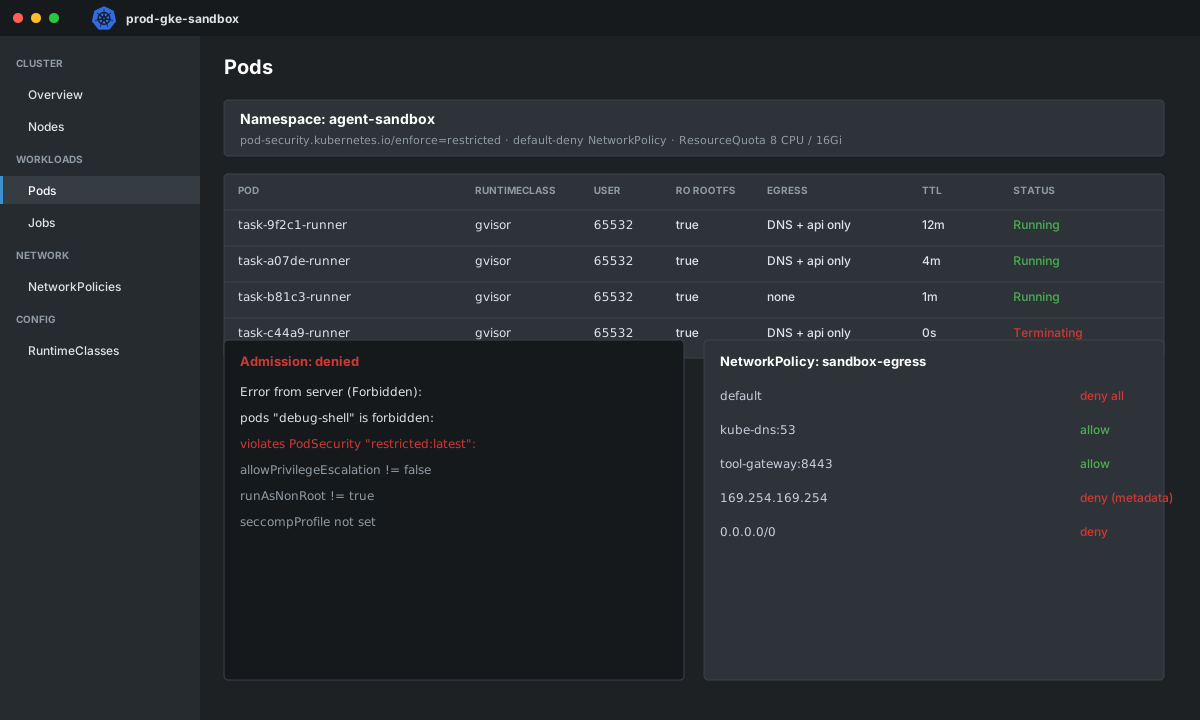
The restricted level rejects privileged pods, host namespaces, host paths, privilege escalation and root users. A pod like the debug shell in the figure fails admission with an error listing exactly which fields are wrong.
Pod Security does not know about your RuntimeClass, though. Add a ValidatingAdmissionPolicy (stable since Kubernetes 1.30) for the rules that are specific to you:
apiVersion: admissionregistration.k8s.io/v1
kind: ValidatingAdmissionPolicy
metadata:
  name: sandbox-requirements
spec:
  failurePolicy: Fail
  matchConstraints:
    resourceRules:
      - apiGroups: [""]
        apiVersions: ["v1"]
        operations: ["CREATE", "UPDATE"]
        resources: ["pods"]
  validations:
    - expression: "has(object.spec.runtimeClassName) && object.spec.runtimeClassName == 'gvisor'"
      message: "Pods in the sandbox namespace must use the gvisor RuntimeClass."
    - expression: "has(object.spec.automountServiceAccountToken) && object.spec.automountServiceAccountToken == false"
      message: "Service account tokens must not be mounted."
    - expression: "object.spec.containers.all(c, has(c.resources) && has(c.resources.limits) && 'memory' in c.resources.limits && 'cpu' in c.resources.limits)"
      message: "Every container needs CPU and memory limits."
    - expression: "!has(object.spec.hostNetwork) || object.spec.hostNetwork == false"
      message: "hostNetwork is not allowed."
---
apiVersion: admissionregistration.k8s.io/v1
kind: ValidatingAdmissionPolicyBinding
metadata:
  name: sandbox-requirements
spec:
  policyName: sandbox-requirements
  validationActions: ["Deny"]
  matchResources:
    namespaceSelector:
      matchLabels:
        kubernetes.io/metadata.name: agent-sandbox
Also cap the namespace so a bug in your controller cannot create a thousand pods:
apiVersion: v1
kind: ResourceQuota
metadata: { name: sandbox-quota, namespace: agent-sandbox }
spec:
  hard:
    pods: "50"
    requests.cpu: "25"
    requests.memory: 50Gi
    limits.cpu: "50"
    limits.memory: 100Gi
    requests.ephemeral-storage: 20Gi
Layer 4: Network isolation
Without a NetworkPolicy, every pod can talk to every other pod and to the internet. Start by denying everything, then add only what you need.
apiVersion: networking.k8s.io/v1
kind: NetworkPolicy
metadata: { name: default-deny, namespace: agent-sandbox }
spec:
  podSelector: {}
  policyTypes: [Ingress, Egress]
---
apiVersion: networking.k8s.io/v1
kind: NetworkPolicy
metadata: { name: sandbox-egress, namespace: agent-sandbox }
spec:
  podSelector:
    matchLabels: { app: sandbox-task }
  policyTypes: [Egress]
  egress:
    - to:       # DNS
        - namespaceSelector:
            matchLabels: { kubernetes.io/metadata.name: kube-system }
          podSelector:
            matchLabels: { k8s-app: kube-dns }
      ports:
        - { protocol: UDP, port: 53 }
        - { protocol: TCP, port: 53 }
    - to:       # the one controlled exit
        - namespaceSelector:
            matchLabels: { kubernetes.io/metadata.name: tool-gateway }
      ports:
        - { protocol: TCP, port: 8443 }
Three notes from experience:
- NetworkPolicy only works if your CNI enforces it. Verify with a test instead of assuming.
- Block the cloud metadata endpoint explicitly in the network layer as well, because an IP allow rule like
0.0.0.0/0 except ...is easy to get wrong. On AWS also require IMDSv2 with a hop limit of 1 on the nodes, and prefer workload identity features that do not expose node credentials to pods. - If tasks legitimately need package installs or web access, do not open the internet. Route through the gateway, or use FQDN-aware policy from your CNI. With Cilium:
apiVersion: cilium.io/v2
kind: CiliumNetworkPolicy
metadata: { name: allow-package-index, namespace: agent-sandbox }
spec:
  endpointSelector:
    matchLabels: { app: sandbox-task, needs-packages: "true" }
  egress:
    - toEndpoints:
        - matchLabels:
            "k8s:io.kubernetes.pod.namespace": kube-system
            "k8s:k8s-app": kube-dns
      toPorts:
        - ports: [{ port: "53", protocol: ANY }]
          rules:
            dns:
              - matchName: "pypi.org"
              - matchName: "files.pythonhosted.org"
    - toFQDNs:
        - matchName: "pypi.org"
        - matchName: "files.pythonhosted.org"
      toPorts:
        - ports: [{ port: "443", protocol: TCP }]
Layer 5: The spawner is part of the attack surface
The service that creates sandbox Jobs holds real permissions. Give it the least it needs, and do not let it create arbitrary pod specs from user input.
# spawner.py
from kubernetes import client, config

config.load_incluster_config()
batch = client.BatchV1Api()

def run_task(task_id: str, image_digest: str, command: list[str]) -> str:
    job = client.V1Job(
        metadata=client.V1ObjectMeta(generate_name=f"task-{task_id[:8]}-",
                                     namespace="agent-sandbox",
                                     labels={"app": "sandbox-task", "task-id": task_id}),
        spec=client.V1JobSpec(
            backoff_limit=0, active_deadline_seconds=900, ttl_seconds_after_finished=60,
            template=client.V1PodTemplateSpec(
                metadata=client.V1ObjectMeta(labels={"app": "sandbox-task"}),
                spec=client.V1PodSpec(
                    runtime_class_name="gvisor", restart_policy="Never",
                    automount_service_account_token=False, host_users=False,
                    security_context=client.V1PodSecurityContext(
                        run_as_non_root=True, run_as_user=65532,
                        seccomp_profile=client.V1SeccompProfile(type="RuntimeDefault")),
                    containers=[client.V1Container(
                        name="runner", image=f"registry.example.com/sandbox-runner@{image_digest}",
                        command=command,
                        security_context=client.V1SecurityContext(
                            allow_privilege_escalation=False, read_only_root_filesystem=True,
                            capabilities=client.V1Capabilities(drop=["ALL"])),
                        resources=client.V1ResourceRequirements(
                            requests={"cpu": "500m", "memory": "512Mi"},
                            limits={"cpu": "1", "memory": "1Gi"}))])))))
    created = batch.create_namespaced_job("agent-sandbox", job)
    return created.metadata.name
The caller chooses the task and the command. It does not choose the runtime class, the security context or the namespace. Those are fixed in code, and the admission policy double-checks them.
apiVersion: rbac.authorization.k8s.io/v1
kind: Role
metadata: { name: sandbox-spawner, namespace: agent-sandbox }
rules:
  - apiGroups: ["batch"]
    resources: ["jobs"]
    verbs: ["create", "get", "list", "watch", "delete"]
  - apiGroups: [""]
    resources: ["pods", "pods/log"]
    verbs: ["get", "list"]
No pods/exec, no secrets, no cluster-wide roles.
Verify, do not assume
Write the checks down and run them in CI against a test cluster. A sandbox you have not attacked is a hope.
# 1. Privileged pods are rejected
kubectl -n agent-sandbox run debug-shell --image=busybox --privileged -- sleep 3600
# expect: Forbidden, violates PodSecurity "restricted:latest"

# 2. Pods without the runtime class are rejected
kubectl -n agent-sandbox apply -f test/pod-no-runtimeclass.yaml
# expect: denied by sandbox-requirements

# 3. From inside a sandbox pod: no internet, no metadata, no other pods
kubectl -n agent-sandbox exec <task-pod> -- sh -c 'wget -T 3 -qO- http://169.254.169.254/ || echo blocked'
kubectl -n agent-sandbox exec <task-pod> -- sh -c 'wget -T 3 -qO- https://example.com || echo blocked'

# 4. No Kubernetes credentials available
kubectl -n agent-sandbox exec <task-pod> -- ls /var/run/secrets/kubernetes.io/serviceaccount
# expect: No such file or directory

# 5. Runtime is gVisor
kubectl -n agent-sandbox exec <task-pod> -- dmesg | head -3
# expect gVisor-style kernel messages, not the host kernel
Detection and response
Prevention fails eventually, so watch for it:
| Signal | Source | Action |
|---|---|---|
| Admission denials in the sandbox namespace | API server audit log | Someone or something is trying to bypass policy |
Pods that hit activeDeadlineSeconds or OOM | Job and pod status | Review for abuse or a bad task profile |
| Unexpected egress attempts | CNI flow logs (for example Cilium Hubble) | Investigate the task and the user |
| Syscall anomalies | Runtime security tooling such as Falco | Alert and terminate |
| Pod count near quota | Metrics | Controller bug or abuse |
Put these on a Grafana board with alert rules. A security control you cannot see is one you cannot trust.
What this does not cover
- Prompt injection upstream. The sandbox limits what injected code can do. It does not stop the model from being tricked into writing it, so keep least privilege on every tool the agent can call.
- Data inside the sandbox. Whatever you put into the workspace, the task can read and return. Mount only what the task needs.
- Multi-tenancy. If different customers' tasks run on the same nodes, consider separate node pools or clusters per trust level.
- Supply chain. The runner image is trusted code. Pin by digest, sign it, and scan it.
Wrap-up
A safe agent sandbox is five ordinary controls layered on purpose: a second kernel boundary, a locked-down pod spec, admission that enforces it, a network with nowhere to go, and a spawner with no extra power. None of them is exotic, and each assumes the one before it will eventually fail. Build the verification checks first, run them continuously, and you will know your sandbox works instead of hoping it does.