Kubernetes Autoscaling with KEDA and Karpenter: Scaling Event-Driven Workloads on EKS and GKE
CPU-based autoscaling works for web servers whose load shows up as CPU. It fails for the workloads that dominate modern backends: queue consumers, stream processors, batch jobs and anything waiting on I/O. A consumer with 50,000 messages behind it can sit at 10 percent CPU while the backlog grows. Scaling has to follow the thing that actually represents demand.
Autoscaling is also two problems that people conflate. First you need more pods. Then, if the cluster has no room, you need more nodes. This post solves them with two tools that fit together well: KEDA for pod scaling on external signals, and Karpenter for node provisioning on AWS EKS. It then covers what changes on GKE, where the node side works differently.
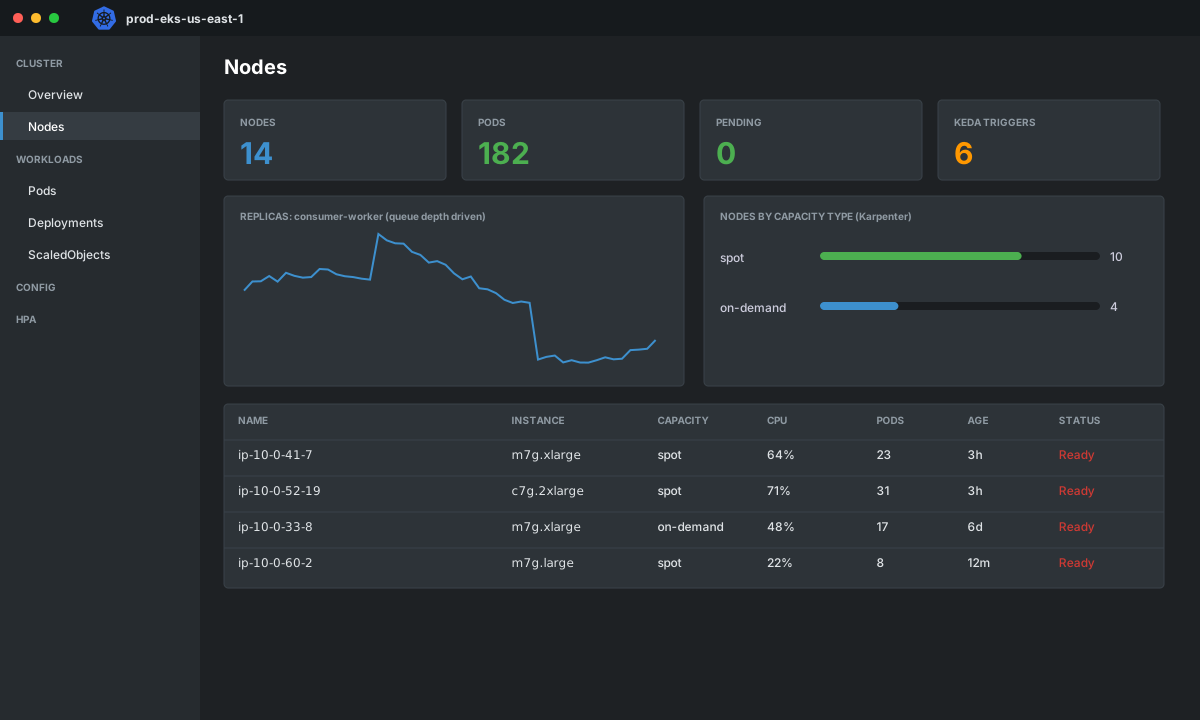
Two layers, two controllers
| Layer | Question | Tool | Reacts to |
|---|---|---|---|
| Pod | How many replicas should run? | KEDA (drives an HPA) | Queue length, lag, request rate, cron, any metric |
| Node | How much compute should exist? | Karpenter, Cluster Autoscaler, GKE autoscaling | Pending pods and underutilized nodes |
If either layer lags, scaling feels broken. Pods that scale instantly with no nodes just sit Pending. Nodes that appear fast with a slow pod signal waste money.
Layer 1: KEDA
KEDA is a small operator that exposes external metrics to Kubernetes and creates the HPA for you. Install it with Helm:
helm repo add kedacore https://kedacore.github.io/charts
helm upgrade --install keda kedacore/keda -n keda --create-namespace
Scaling an SQS consumer
Authentication is the part to get right. Use the pod identity of the KEDA operator through IAM Roles for Service Accounts rather than static keys:
apiVersion: keda.sh/v1alpha1
kind: TriggerAuthentication
metadata:
  name: aws-pod-identity
  namespace: workers
spec:
  podIdentity:
    provider: aws
---
apiVersion: keda.sh/v1alpha1
kind: ScaledObject
metadata:
  name: consumer-worker
  namespace: workers
spec:
  scaleTargetRef:
    name: consumer-worker            # Deployment
  minReplicaCount: 1
  maxReplicaCount: 200
  pollingInterval: 15
  cooldownPeriod: 120
  advanced:
    horizontalPodAutoscalerConfig:
      behavior:
        scaleUp:
          stabilizationWindowSeconds: 0
          policies:
            - { type: Percent, value: 100, periodSeconds: 30 }
        scaleDown:
          stabilizationWindowSeconds: 300
          policies:
            - { type: Pods, value: 5, periodSeconds: 60 }
  triggers:
    - type: aws-sqs-queue
      authenticationRef:
        name: aws-pod-identity
      metadata:
        queueURL: https://sqs.us-east-1.amazonaws.com/123456789012/orders
        queueLength: "20"            # target messages per replica
        awsRegion: us-east-1
queueLength is the number you tune. It means "one replica should handle about this many visible messages". If one worker clears 20 messages in your latency budget, 20 is right. Too low and you over-provision. Too high and the queue drains too slowly.
The behavior block deserves attention. Scale up aggressively because backlog means customers are waiting, and scale down slowly to avoid flapping during bursty traffic.
Other triggers worth knowing
| Trigger | Use | Key setting |
|---|---|---|
aws-sqs-queue | SQS consumers | queueLength |
gcp-pubsub | Pub/Sub subscribers | subscriptionName, value |
kafka | Consumer groups | lagThreshold, topic |
prometheus | Anything you already measure | query, threshold |
cron | Known peaks (scale before the 9am rush) | start, end, desiredReplicas |
cpu / memory | Combined with others | type: Utilization |
You can combine triggers. The replica count follows the highest demand, which is useful for "scale on queue depth, but never below 5 pods during business hours":
  triggers:
    - type: aws-sqs-queue
      metadata: { queueURL: "...", queueLength: "20", awsRegion: us-east-1 }
      authenticationRef: { name: aws-pod-identity }
    - type: cron
      metadata:
        timezone: America/New_York
        start: 0 8 * * 1-5
        end: 0 18 * * 1-5
        desiredReplicas: "5"
Scale-to-zero is available (minReplicaCount: 0), and it is a good fit for rarely used queues. Remember the cost: the first message waits for a pod to start, and possibly for a node. Decide whether that delay is acceptable for the queue.
One rule: do not put a separate HPA on a workload KEDA manages. KEDA creates and owns the HPA, and two controllers editing the same replicas field produce confusing flapping.
Layer 2: Karpenter on EKS
Karpenter looks at unschedulable pods, works out what they need, and launches nodes sized for them. Compared with node groups and Cluster Autoscaler, there are no fixed instance types per group. You describe constraints, and it picks from the whole instance catalogue.
Karpenter reached v1.0 in 2024, with stable NodePool and EC2NodeClass APIs. This is a production-leaning configuration for the workers above:
apiVersion: karpenter.sh/v1
kind: NodePool
metadata:
  name: workers
spec:
  template:
    metadata:
      labels:
        workload: queue-workers
    spec:
      nodeClassRef:
        group: karpenter.k8s.aws
        kind: EC2NodeClass
        name: default
      requirements:
        - key: karpenter.sh/capacity-type
          operator: In
          values: ["spot", "on-demand"]
        - key: kubernetes.io/arch
          operator: In
          values: ["arm64", "amd64"]
        - key: karpenter.k8s.aws/instance-category
          operator: In
          values: ["c", "m", "r"]
        - key: karpenter.k8s.aws/instance-generation
          operator: Gt
          values: ["5"]
      expireAfter: 720h
  limits:
    cpu: "1000"
    memory: 4000Gi
  disruption:
    consolidationPolicy: WhenEmptyOrUnderutilized
    consolidateAfter: 1m
---
apiVersion: karpenter.k8s.aws/v1
kind: EC2NodeClass
metadata:
  name: default
spec:
  role: KarpenterNodeRole-prod
  amiSelectorTerms:
    - alias: al2023@latest
  subnetSelectorTerms:
    - tags: { karpenter.sh/discovery: prod }
  securityGroupSelectorTerms:
    - tags: { karpenter.sh/discovery: prod }
  blockDeviceMappings:
    - deviceName: /dev/xvda
      ebs: { volumeSize: 50Gi, volumeType: gp3, encrypted: true }
What each block does:
| Setting | Effect | Why I set it |
|---|---|---|
capacity-type: spot, on-demand | Karpenter prefers spot when it can | Large savings for fault-tolerant workers, with on-demand as fallback |
arch: arm64, amd64 | Allows Graviton | Often better price and performance. Your images must be multi-arch |
instance-category and generation | Limits to modern general, compute and memory families | Avoids odd, old or expensive types |
limits | Hard ceiling for the pool | A runaway scale-up hits a limit before it hits your budget |
consolidationPolicy | Replaces underused nodes with cheaper or fewer ones | Keeps the bill tracking the real load |
expireAfter | Nodes recycle after 30 days | Fresh AMIs and fewer long-lived snowflakes |
Make workloads cooperate
Karpenter can only pack what you describe. Pods with no resource requests look free and get stacked onto nodes until they fall over. The worker Deployment needs honest requests and a disruption budget:
apiVersion: apps/v1
kind: Deployment
metadata: { name: consumer-worker, namespace: workers }
spec:
  template:
    spec:
      nodeSelector:
        workload: queue-workers
      terminationGracePeriodSeconds: 120
      topologySpreadConstraints:
        - maxSkew: 1
          topologyKey: topology.kubernetes.io/zone
          whenUnsatisfiable: ScheduleAnyway
          labelSelector: { matchLabels: { app: consumer-worker } }
      containers:
        - name: worker
          image: registry.example.com/consumer-worker@sha256:...
          resources:
            requests: { cpu: "500m", memory: 512Mi }
            limits:   { memory: 512Mi }
---
apiVersion: policy/v1
kind: PodDisruptionBudget
metadata: { name: consumer-worker, namespace: workers }
spec:
  maxUnavailable: 20%
  selector: { matchLabels: { app: consumer-worker } }
Spot nodes get a two-minute interruption notice. Karpenter handles the notice through an SQS interruption queue, cordons and drains the node, and your pods must finish in-flight messages within terminationGracePeriodSeconds. Make consumers idempotent and have them stop pulling new messages on SIGTERM. At-least-once delivery will redeliver whatever was in flight, so processing the same message twice must be safe.
The GKE version
GKE has the same two layers, with different node-side tooling.
| Concern | EKS | GKE |
|---|---|---|
| Pod scaling on external signals | KEDA | KEDA, or HPA with external metrics from Cloud Monitoring |
| Node provisioning | Karpenter (or Cluster Autoscaler) | Autopilot, or Standard with node auto-provisioning and compute classes |
| Spot | karpenter.sh/capacity-type: spot | Spot VMs via cloud.google.com/gke-spot: "true" node selector |
| Pub/Sub or SQS trigger | aws-sqs-queue | gcp-pubsub |
| Workload identity | IRSA or EKS Pod Identity | Workload Identity Federation for GKE |
KEDA is portable, so the ScaledObject only changes in the trigger and authentication:
apiVersion: keda.sh/v1alpha1
kind: TriggerAuthentication
metadata: { name: gcp-workload-identity, namespace: workers }
spec:
  podIdentity:
    provider: gcp
---
apiVersion: keda.sh/v1alpha1
kind: ScaledObject
metadata: { name: consumer-worker, namespace: workers }
spec:
  scaleTargetRef: { name: consumer-worker }
  minReplicaCount: 1
  maxReplicaCount: 200
  triggers:
    - type: gcp-pubsub
      authenticationRef: { name: gcp-workload-identity }
      metadata:
        subscriptionName: orders-worker
        mode: SubscriptionSize
        value: "20"
For spot capacity on GKE, request it from the pod spec and let the platform provision nodes:
    spec:
      nodeSelector:
        cloud.google.com/gke-spot: "true"
      terminationGracePeriodSeconds: 25    # Spot VMs give ~30 seconds notice
Note the shorter notice. GKE Spot VMs get about 30 seconds, and AWS Spot gives two minutes, so worker shutdown logic written for one may not hold on the other.
Observing both layers
Scaling problems are visible if you look at the right pairs of signals:
| Symptom | Check | Likely cause |
|---|---|---|
| Queue grows, replicas flat | KEDA ScaledObject status and operator logs | Auth failure, wrong queue URL, maxReplicaCount reached |
| Replicas grow, pods Pending | kubectl get pods --field-selector=status.phase=Pending | No capacity, NodePool limits hit, no matching instance types |
| Pending for minutes | Karpenter logs, kubectl get nodeclaims | Quota limit, no subnet IPs, unavailable Spot in the chosen types |
| Nodes churn constantly | Karpenter disruption events | Consolidation too aggressive, no PDB, consolidateAfter too short |
| Costs creep up | Node count by instance type | Requests too high, old node pools, limits too generous |
# Backlog per replica: the number KEDA is trying to hold near queueLength
sum(aws_sqs_approximate_number_of_messages_visible{queue_name="orders"})
  /
sum(kube_deployment_status_replicas{deployment="consumer-worker"})

# Pods waiting for a node
sum(kube_pod_status_phase{phase="Pending", namespace="workers"})

# Karpenter node launches
sum(rate(karpenter_nodeclaims_created_total[5m])) by (reason)
A checklist before production
- Every pod has CPU and memory requests that reflect real use.
- Workers handle
SIGTERMand finish or release in-flight work within the grace period. - Processing is idempotent, because spot reclaims and retries cause redelivery.
- NodePool
limitsand KEDAmaxReplicaCountare set deliberately, not left unlimited. - Images are multi-arch if you allow ARM.
- PodDisruptionBudgets exist for anything you cannot afford to lose all at once.
- You have tested the failure case: the queue spikes 50 times, the Spot pool is empty, and a quota limit is reached.
Wrap-up
Scale pods on the signal that represents demand, then let the node layer react to pending pods. KEDA and Karpenter cover those two jobs cleanly on EKS, and KEDA carries the same pod-side pattern to GKE with different node tooling beneath it. Set limits first, tune queueLength from real message processing time, and test the ugly cases before the next launch day tests them for you.