S3 Vectors: How to build a RAG without a vector database
Every RAG tutorial follows the same script: embed your documents, spin up a vector database (Pinecone, Weaviate, pgvector, OpenSearch), manage its infrastructure, and pray the costs don't spiral. For most internal AI apps, this is overkill.
Amazon S3 Vectors changes the equation. It's native vector storage built into S3 — no clusters, no provisioning, no idle compute. You store vectors like you store objects, query them with sub-100ms latency, and pay per use. It went GA in December 2025 and now supports 2 billion vectors per index across 31+ AWS regions.
This post walks through building a complete RAG pipeline using only S3 Vectors and Amazon Bedrock. No external vector database. ~50 lines of Python.
Architecture
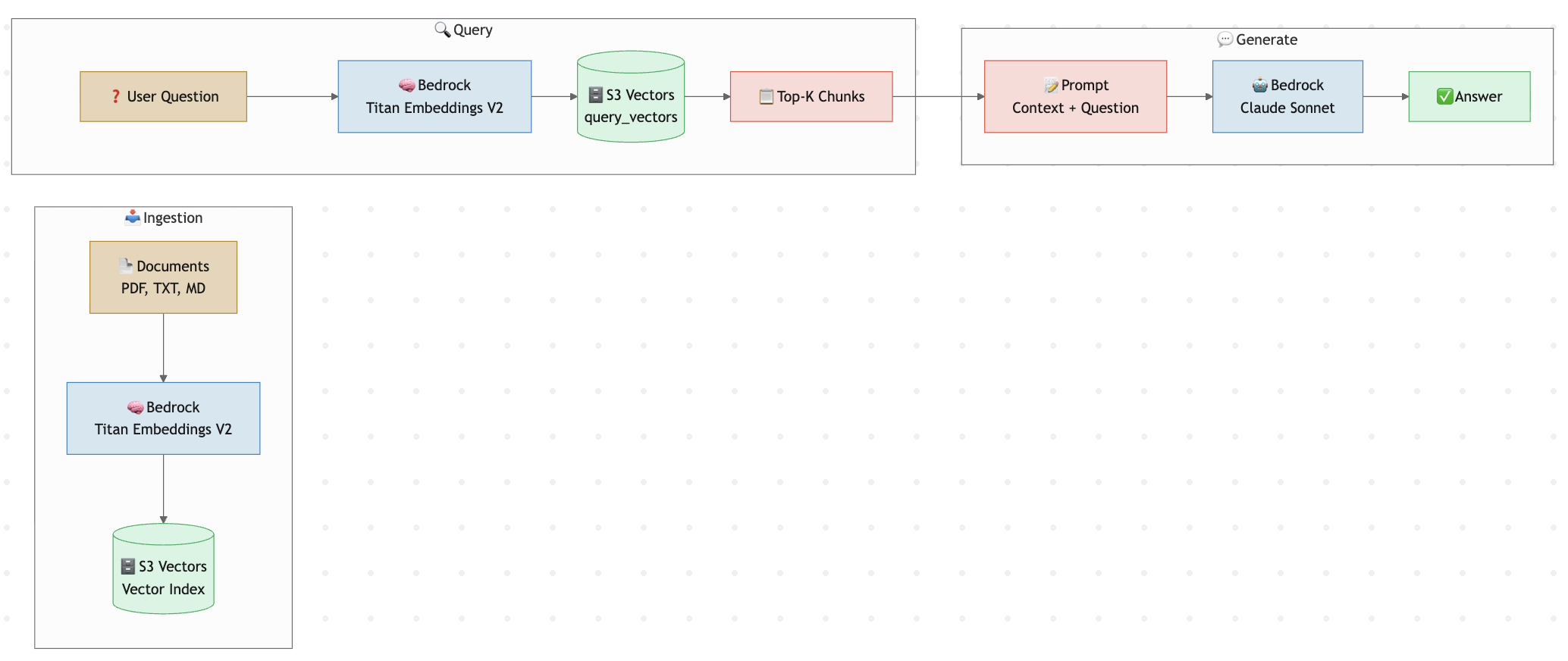
Three phases, two AWS services, zero infrastructure.
S3 Vectors vs Traditional Vector Databases
| S3 Vectors | Managed Vector DB (e.g. OpenSearch, Pinecone) | |
|---|---|---|
| Infrastructure | None — fully serverless | Clusters, shards, replicas |
| Scale | 2B vectors/index, 10K indexes/bucket | Varies, often requires re-sharding |
| Query latency | ~100ms (frequent), <1s (infrequent) | ~10-50ms |
| Cost model | Pay per PUT + storage + query | Hourly/monthly compute + storage |
| Cost at scale | Up to 90% cheaper | Idle compute adds up fast |
| Metadata filtering | Up to 50 keys, filterable by default | Full query language |
| Best for | RAG, agent memory, semantic search | High-QPS production search, hybrid search |
The tradeoff is clear: S3 Vectors trades single-digit-ms latency for zero ops and dramatically lower cost. For internal RAG apps, agent memory, and moderate-QPS workloads, it's the better choice.
Step 1: Set Up S3 Vectors
Create a vector bucket and index. You can do this in the console or via CLI:
# Create a vector bucket
aws s3vectors create-vector-bucket \
  --vector-bucket-name my-rag-bucket

# Create a vector index (1024 dims for Titan Embeddings V2)
aws s3vectors create-vector-index \
  --vector-bucket-name my-rag-bucket \
  --index-name my-rag-index \
  --dimension 1024 \
  --distance-metric cosine
That's your "database" — done in two commands.
Step 2: Ingest Documents
Here's the ingestion pipeline. We chunk text, embed each chunk with Titan Embeddings V2, and store vectors with metadata:
import boto3
import json
import uuid

bedrock = boto3.client("bedrock-runtime", region_name="us-west-2")
s3vectors = boto3.client("s3vectors", region_name="us-west-2")

BUCKET = "my-rag-bucket"
INDEX = "my-rag-index"


def embed(text: str) -> list[float]:
    """Generate embeddings using Titan Text Embeddings V2."""
    response = bedrock.invoke_model(
        modelId="amazon.titan-embed-text-v2:0",
        body=json.dumps({"inputText": text}),
    )
    return json.loads(response["body"].read())["embedding"]


def chunk_text(text: str, chunk_size: int = 500) -> list[str]:
    """Split text into overlapping chunks."""
    words = text.split()
    chunks = []
    for i in range(0, len(words), chunk_size - 50):
        chunk = " ".join(words[i : i + chunk_size])
        if chunk:
            chunks.append(chunk)
    return chunks


def ingest(doc_text: str, source: str):
    """Chunk, embed, and store a document."""
    chunks = chunk_text(doc_text)
    vectors = []

    for i, chunk in enumerate(chunks):
        vectors.append({
            "key": f"{source}::chunk-{i}",
            "data": {"float32": embed(chunk)},
            "metadata": {
                "source": source,
                "chunk_index": i,
                "text": chunk,  # store original text for retrieval
            },
        })

    # PutVectors supports batches
    s3vectors.put_vectors(
        vectorBucketName=BUCKET,
        indexName=INDEX,
        vectors=vectors,
    )
    print(f"Ingested {len(vectors)} chunks from {source}")
Usage:
with open("internal-docs.txt") as f:
    ingest(f.read(), source="internal-docs.txt")
Step 3: Query + Generate
Now the RAG loop — embed the question, find similar chunks, and feed them to Claude:
def rag_query(question: str, top_k: int = 5) -> str:
    """Full RAG pipeline: retrieve + generate."""

    # 1. Embed the question
    query_vector = embed(question)

    # 2. Find similar chunks
    results = s3vectors.query_vectors(
        vectorBucketName=BUCKET,
        indexName=INDEX,
        topK=top_k,
        queryVector={"float32": query_vector},
        returnMetadata=True,
        returnDistance=True,
    )

    # 3. Build context from retrieved chunks
    context_parts = []
    for v in results["vectors"]:
        text = v["metadata"]["text"]
        source = v["metadata"]["source"]
        dist = round(v["distance"], 4)
        context_parts.append(
            f"[Source: {source}, Distance: {dist}]\n{text}"
        )
    context = "\n\n---\n\n".join(context_parts)

    # 4. Generate answer with Claude
    prompt = f"""Answer the question based on the provided context.
If the context doesn't contain enough information, say so.

## Context
{context}

## Question
{question}

## Answer"""

    response = bedrock.invoke_model(
        modelId="us.anthropic.claude-sonnet-4-20250514",
        body=json.dumps({
            "anthropic_version": "bedrock-2023-05-31",
            "max_tokens": 1024,
            "messages": [{"role": "user", "content": prompt}],
        }),
    )

    body = json.loads(response["body"].read())
    return body["content"][0]["text"]
Usage:
answer = rag_query("What is our refund policy for enterprise customers?")
print(answer)
That's the entire RAG pipeline — ~50 lines of actual logic, no infrastructure.
Step 4: Metadata Filtering
S3 Vectors supports filtering by metadata during queries. This is powerful for multi-tenant or multi-source RAG:
# Only search chunks from a specific document
results = s3vectors.query_vectors(
    vectorBucketName=BUCKET,
    indexName=INDEX,
    topK=5,
    queryVector={"float32": query_vector},
    returnMetadata=True,
    filter={"source": {"eq": "refund-policy.pdf"}},
)
Filter operators include eq, ne, gt, gte, lt, lte, in, beginsWith, and logical and/or combinators.
Data Flow
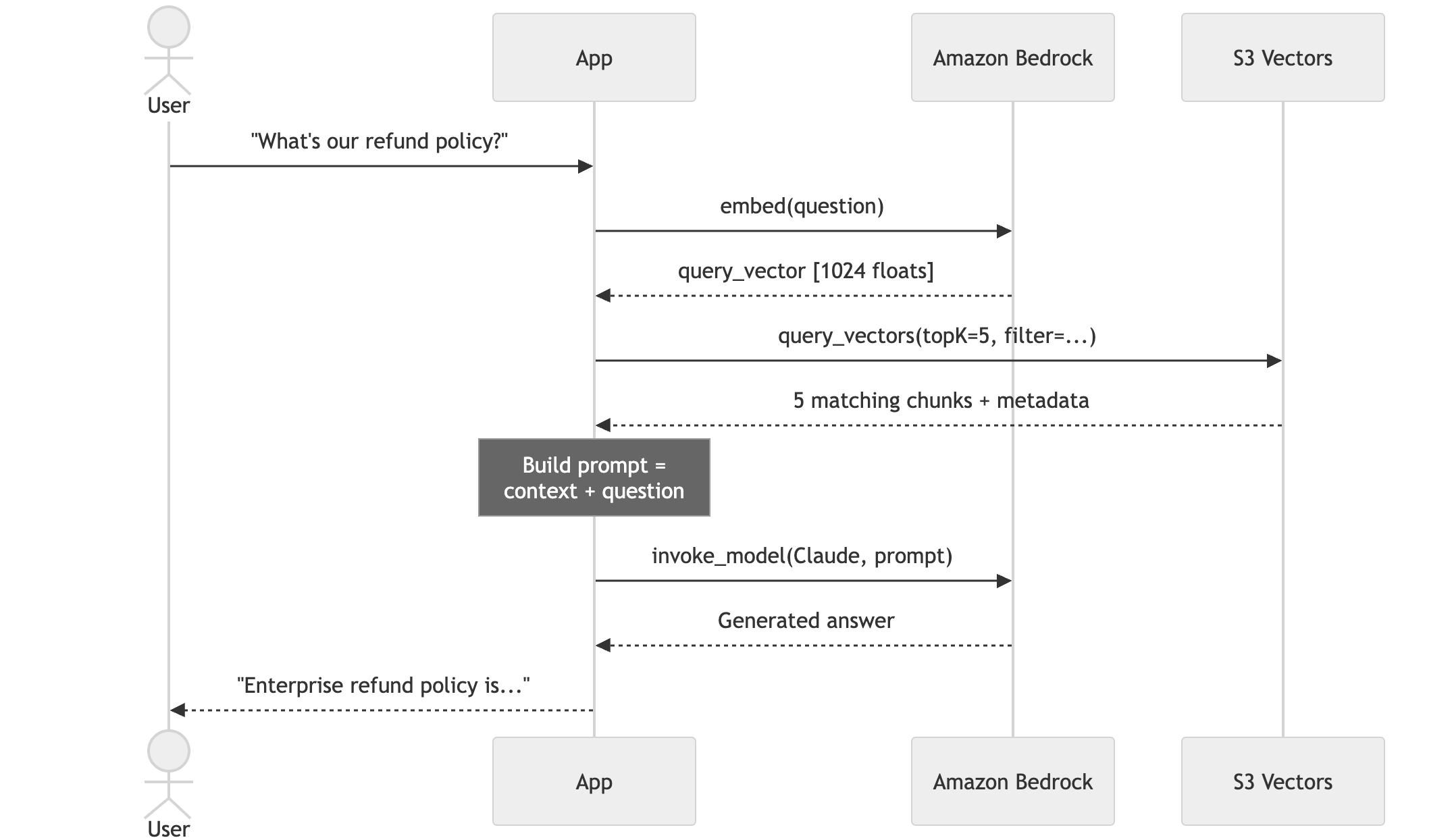
Here's how a query flows through the system end to end:
When to Use S3 Vectors (and When Not To)
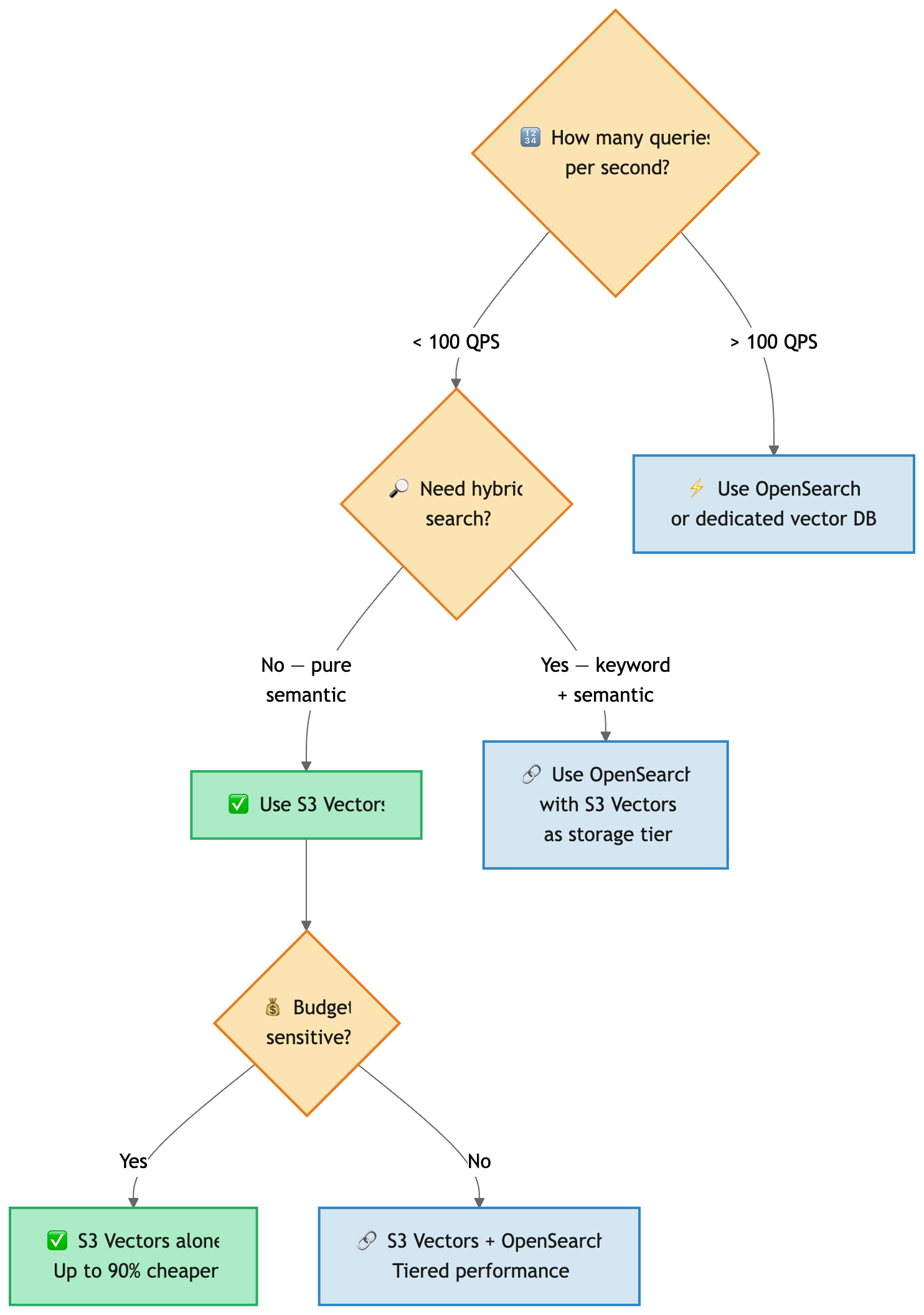
Use S3 Vectors when:
- You're building internal RAG apps, agent memory, or semantic search
- Query volume is moderate (not thousands of QPS)
- You want zero infrastructure management
- Cost matters more than single-digit-ms latency
Use a dedicated vector DB when:
- You need <10ms query latency consistently
- You need hybrid search (keyword + semantic)
- Your QPS is in the hundreds or thousands
- You need advanced features like aggregations or faceted search
Use both (tiered): S3 Vectors as cheap, durable storage + OpenSearch for hot queries. AWS supports this integration natively.
Integrating with Bedrock Knowledge Bases
If you don't want to write the chunking and embedding code yourself, Bedrock Knowledge Bases can use S3 Vectors as its vector store directly:
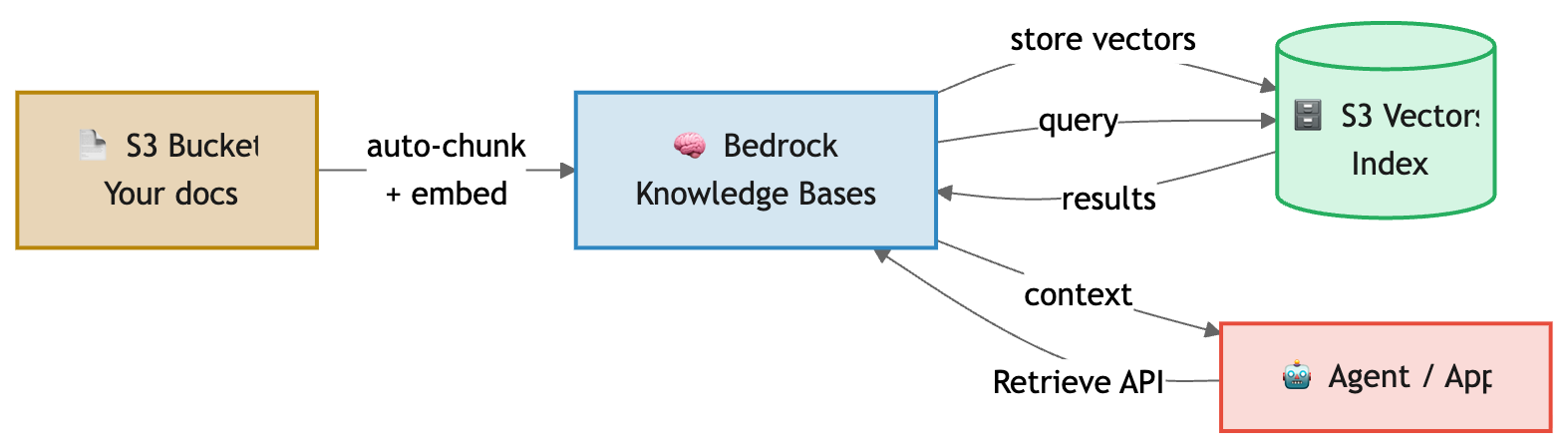
Just select "S3 Vectors" as the vector store when creating your Knowledge Base. Bedrock handles chunking, embedding, and storage automatically.
Cleanup
# Delete the vector index
aws s3vectors delete-vector-index \
  --vector-bucket-name my-rag-bucket \
  --index-name my-rag-index

# Delete the vector bucket
aws s3vectors delete-vector-bucket \
  --vector-bucket-name my-rag-bucket